Quick Answer
Spend more on the VDV MapMaster 3.0 only if you are running cable through walls and need to see which wire is at fault, how long a run is, or which jack is which. One remote comes with the tester; numbered ID remotes for more runs are bought separately.
If you only use pre-made cables, you may not need a tester at all.
When you do not need a tester
If you bought pre-made patch cables and one does not work, swap it for a cable you know is good. If the problem moves with the cable, the cable is bad. Our guide to testing a cable without a tester covers the other checks you can do with what you have.
When a basic tester is enough
You need a tester once you start making your own cables. A crimped plug can look right and still have a wire out of place. A pass or fail tester tells you before you plug it in and start chasing a network problem that is really a bad crimp.
For a few cables, a basic tester is all you need.
When to spend more
Spend more when the cable is inside your walls:
- You need to see which wire is wrong. A tester with a display shows the fault, so you know which end to re-terminate.
- You need length. Useful when you are planning runs or checking how far a run goes.
- You have several jacks to sort out. ID remotes tell you which run goes to which jack. One remote comes with the tester; numbered ID remotes for more runs are bought separately.
What we sell for home use
| Tester | Who it is for | What it tells you | Price |
|---|---|---|---|
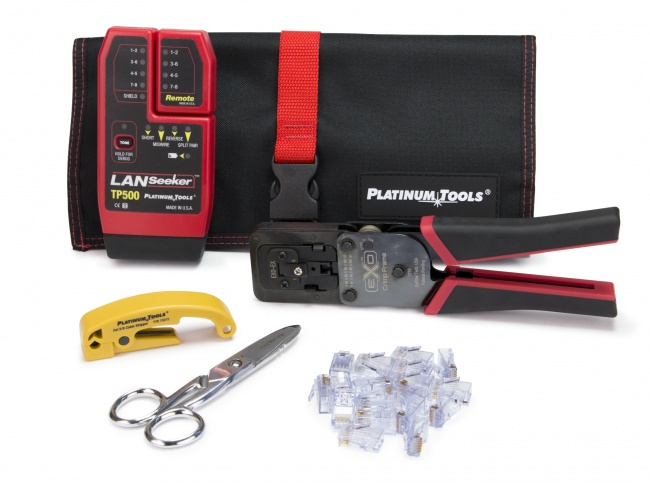
| LanSeeker | Checking cables you make | Pass or fail wiremap on lights; built-in tone | $80.08 |
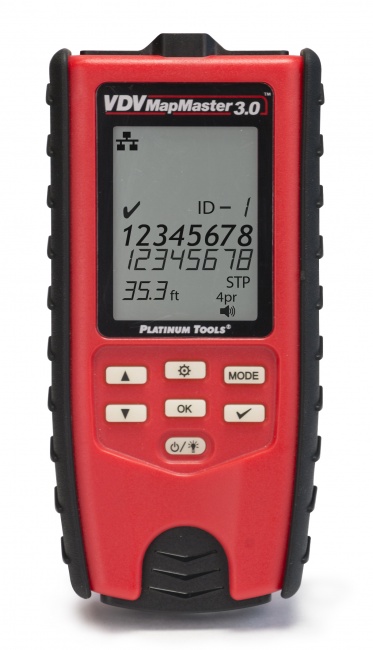
| VDV MapMaster 3.0 | Runs in walls, several jacks | Wiremap on a display, including split pairs; length to 1,000 ft; ID remotes for up to 20 runs | $168.14 |
LanSeeker: for cables you make yourself
The LanSeeker gives a pass or fail wiremap result in about 2 seconds. Four pair lights, a shield light, four fault lights and a tone light show the result. It has no display, so it tells you whether the cable is good rather than describing the fault on a screen.
It also has built-in tone, so with a probe you can follow a run from one end.
What it does not do: test your internet speed or link speed, or check PoE.
VDV MapMaster 3.0: for runs in your walls
The VDV MapMaster 3.0 shows the wiremap on a 2.75 in backlit display: opens, shorts, miswires, reversals and split pairs, to T568A or T568B. It measures length from 0 to 1,000 ft, longer than any run in a typical house. Its ID remotes identify up to 20 runs, so you can sort out which jack is which. One remote comes with the tester; numbered ID remotes for more runs are bought separately.
What it does not do: test speed, check PoE or certify a link. For a home network you do not need certification.
Other basic testers
Basic wiremap testers are sold by many brands, including Klein Tools (the LAN Scout Jr. 2) and plenty of unbranded models. For checking a handful of cables you make yourself, a basic tester from any maker you trust does the job. Our testers under $200 guide compares more options.
What no home tester tells you
A wiremap tester checks that each wire lands in the right place. It does not tell you:
- Your internet speed. That is your service and your router.
- The speed the cable will carry. That takes a qualification tester or a certifier, which are tools for professional installers.
- Whether PoE is working. That takes a PoE tester. We do not list one.
How to choose
- Pre-made cables only? You may not need a tester.
- Making a few cables? A pass or fail tester, such as the LanSeeker.
- Running cable in walls, or more than a few jacks? A tester with a display, length and ID remotes, such as the MapMaster.
- Need speed or PoE answers? Neither the LanSeeker nor the MapMaster gives them. See "What no home tester tells you" above.
Frequently Asked Questions
Do I need a network tester if I crimped the RJ45 correctly?
It is worth testing. A crimp can look right and still have a wire out of order or not fully seated. A pass or fail tester takes seconds and saves you from chasing a network problem that is really the plug.
How do I test an Ethernet cable at home?
With a two-piece tester such as the VDV MapMaster 3.0, plug one end of the cable into the main unit and the other end into the remote, then read the result. Without a tester, swap in a cable you know is good and see if the problem goes away. See how to test a cable without a tester.
Will a cable tester tell me my internet speed?
No. A wiremap tester checks the wiring of the cable. Your internet speed depends on your service and your equipment.
Can I test a cable that runs through the wall?
Yes. With the VDV MapMaster 3.0, connect the tester at one jack and its remote at the jack on the other end of the run. Its ID remotes also tell you which jack each run goes to. One remote comes with the tester; numbered ID remotes for more runs are bought separately.
Is the LanSeeker enough for a homelab?
For checking the patch cables you make, yes. If you are wiring jacks in walls and want to see faults and length, the VDV MapMaster 3.0 is the step up.
Cable testers for home use
Both testers are in Cable Testers. Wiring a new house? See our residential prewire test checklist.