When You Need a Workaround
Every cable tech eventually finds themselves on a jobsite without their tester. The kit got left in another truck. The batteries are dead and there are no spares within twenty miles. A second drop appeared mid-job that was not on the quote. The customer wants the run live before the next billable hour starts. Whatever the reason, you need to verify a cable with whatever is in your hand.
The methods below will not give you a certification report. They will not catch every fault a real tester would. But they will catch the gross failures that cause same-day callbacks — opens, shorts, swapped ends, broken pairs — using nothing more than a laptop, a multimeter, or a couple of paperclips. They are field-proven tactics from a generation of installers who learned this trade before $50 testers existed.
Method 1: The Link Light Test
The fastest functional check on the planet. Plug one end of the cable into a switch port (or the LAN port of a router), plug the other end into a laptop, look at the LEDs. A solid or blinking link LED on both ends means at least enough pairs are intact to negotiate a link.
What link light proves
The cable carries enough signal between both endpoints to negotiate Ethernet. For 10/100 Mbps, that requires only two of the four pairs (1-2 and 3-6). For Gigabit Ethernet, all four pairs are needed.
The trap with link light
A cable with a broken or miswired pair will frequently still link — but at 100 Mbps instead of 1 Gbps. Customers do not notice the speed drop because their internet is 50 Mbps anyway, but the next IT person to plug in a NAS will. Always verify negotiated speed.
How to verify negotiated speed
On Windows, open Network & Internet Settings, click your Ethernet adapter, and look at "Link speed". On macOS, open System Settings -> Network -> Ethernet -> Details -> Hardware. On Linux, run ethtool eth0. On a managed switch, check the port status page. Anything below the expected gigabit number on a Cat5e or better drop is a failed cable until proven otherwise.
Method 2: The Sustained Ping Test
Linking is not the same as carrying traffic cleanly. A cable can link at gigabit and still drop packets under load due to marginal NEXT, return loss, or impedance mismatches. A sustained ping is the cheapest way to expose intermittent failure.
The setup
Connect the cable between a laptop and any host on the same network — switch management interface, gateway, another laptop. From a terminal, run a continuous ping with a small interval and watch for losses or latency spikes.
- Windows:
ping -t 192.168.1.1 - macOS / Linux:
ping -i 0.2 192.168.1.1
Let it run for at least two minutes. Anything beyond 0% loss with sub-millisecond latency on a wired LAN is a problem. A clean ping does not certify the cable, but a dirty ping is a hard fail.
The throughput version
If you want to push the cable harder, run an iperf3 transfer between two laptops. A fully working Cat5e or Cat6 channel will sustain 940+ Mbps without drops. A cable that links at gigabit but tops out at 700 Mbps with retransmits has a problem you would have caught with a qualifier.
Method 3: The Paperclip Loopback (Multimeter Method)
If the cable is not yet terminated at both ends, or you cannot reach a switch, a multimeter and a few paperclips will verify continuity on every conductor. This is the oldest trick in the book and still works.
Build the loopback
At one end of the cable, insert four short pieces of paperclip or solid copper jumper wire into the pin slots of the connector (or punch them down on the keystone) to bridge the pairs. Standard pairing for Ethernet:
- Pin 1 to Pin 2 (pair 1, white-orange / orange in T568B)
- Pin 3 to Pin 6 (pair 2, white-green / green in T568B)
- Pin 4 to Pin 5 (pair 3, blue / white-blue in T568B)
- Pin 7 to Pin 8 (pair 4, white-brown / brown in T568B)
Probe at the other end
Set your multimeter to continuity (the audible beep mode). Touch the probes to the pin pairs at the other end of the cable. You should hear a beep on each pair — 1+2, 3+6, 4+5, 7+8. No beep means an open. A beep across the wrong pair (e.g., pin 1 to pin 3) means a miswire.
What this misses
Crossed pairs and split pairs both pass this test. A split pair (where the wires are punched down on the wrong physical pair within the cable) will pass continuity, link at gigabit, and then fail under load. The paperclip method is for verifying the wire is electrically intact, not for verifying it was wired correctly.
Method 4: Switch Port Statistics
If you have access to a managed switch, the port statistics page is one of the most underused diagnostic tools in the industry. Plug the cable in, push some traffic, and watch the counters.
What to watch for
- CRC errors: non-zero and growing means the cable is corrupting frames. Almost always a bad cable, bad termination, or bad transceiver.
- Late collisions: on a full-duplex link this should be zero. Anything else points to a duplex mismatch or impedance issue.
- Runts and giants: indicate framing problems often caused by cable issues at the physical layer.
- Link flap counter: if the link bounces while idle, the cable is marginal.
Cisco, Aruba, Ubiquiti, MikroTik, and every other managed switch exposes these counters. A clean port over 10+ minutes of saturated traffic is the strongest no-tester confirmation you can get short of a real qualifier.
What Field Workarounds Cannot Catch
Be honest with yourself and your customer about the limits of these methods. None of these will catch:
Split pairs
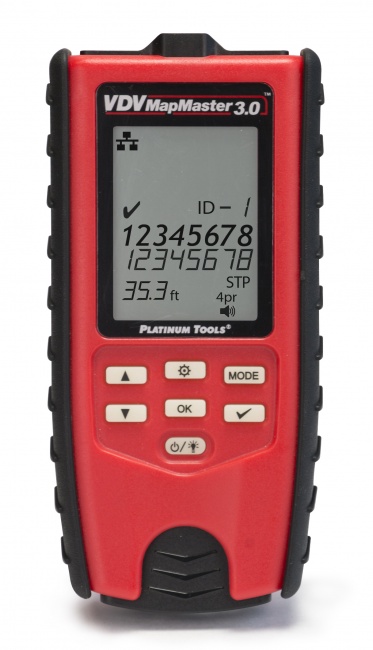
The most dangerous fault in network cabling. A split pair occurs when the wires are connected to the right pins but routed through the wrong physical twisted pair inside the cable. Continuity is fine. Link light is fine. Slow ping is fine. Then the customer plugs in a 4K camera, the link saturates, and crosstalk eats the signal. Only a real tester catches this. The VDV MapMaster 3.0 and most $150+ qualifiers detect split pairs reliably.
Length-related insertion loss
A 110-meter Cat6A run will link at gigabit and ping cleanly all day. It still violates the TIA-568 100-meter channel limit and will produce intermittent issues at 10G that are nearly impossible to diagnose later. Without a tester or certifier, you have no way to know how long the run actually is.
Marginal terminations
A poorly crimped connector with one strand barely touching the contact will pass every workaround in this article — until temperature changes, vibration, or oxidation kill the connection in six months. A real tester measures contact resistance and flags marginal results.
Performance against category specs
You cannot prove a cable meets Cat6 or Cat6A category requirements without sweeping it across the full frequency range with a calibrated certifier. See cable tester vs certifier for the difference between functional verification and category certification.
No-Tester Method Comparison
| Method | Catches | Misses | Time | Confidence |
|---|---|---|---|---|
| Link light only | Open pair pairs 1-2 / 3-6 | Split pairs, broken pairs 4-5 / 7-8 if linked at 100M | 5 sec | Low |
| Link + negotiated speed | Any pair fault that drops link below gigabit | Split pairs | 30 sec | Medium |
| Sustained ping (2 min) | Intermittent drops, gross noise issues | Split pairs, marginal NEXT under heavy load | 2 min | Medium |
| iperf3 saturation | Throughput shortfalls, retransmits | Length, NEXT margin, certified parameters | 5 min | Medium-High |
| Paperclip + multimeter | Opens, shorts, miswires per pair | Split pairs, crossed individual wires | 3 min | Medium |
| Managed switch counters | CRC, runts, link flap, duplex issues | Split pairs at low utilization | 10 min | High |
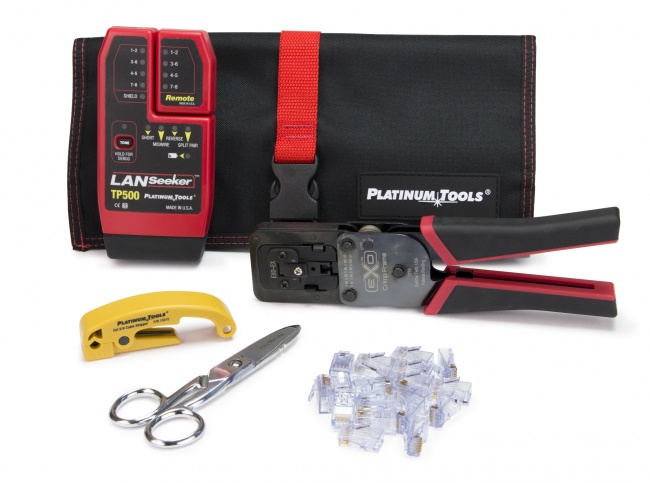
| $50 LanSeeker | Wiremap, opens, shorts, basic split pair | NEXT, length precision, certification | 10 sec | High |
The No-Tester Battle Plan
If you are stuck without a tester and need a defensible verification on a customer site, run all four checks in order:
1. Paperclip loopback at the far end
Before the run is energized, verify continuity on every pair with a multimeter. This is a 3-minute task that catches all open and short faults.
2. Link light + speed negotiation
Connect both ends, look for link, verify the negotiated speed matches the cable category. Anything below gigabit on Cat5e or better is a failure.
3. Sustained ping at minimum 2 minutes
Run a flood ping or 0.2-second interval ping to the gateway. Zero loss is the requirement.
4. Switch port counters after a saturating transfer
If you have a managed switch, push a large file transfer or iperf, then check the port for CRC errors. Zero increment after 10 minutes of saturated traffic is a strong pass.
Pass all four and you can call the run "verified" with reasonable confidence. Document what you did so the next tech understands it was a workaround, not a certification. Then go back and re-test with a real tester within the week. See how to document cable test results for the right format.
Frequently Asked Questions
Can I test a network cable with just a laptop?
Yes, for a basic functional check. Plug both ends into a switch and a laptop, observe link, and verify negotiated speed and a clean sustained ping. This catches opens, shorts, and gross miswires but misses split pairs and marginal NEXT.
Will a multimeter test an Ethernet cable?
A multimeter on continuity mode verifies pin-to-pin connectivity if you make a paperclip loopback at one end. It will not detect crossed pairs, split pairs, or signal quality — only that the copper is electrically connected.
How do I tell if an Ethernet cable is bad without a tester?
Look for: dark or amber link LED, a link that negotiates below the expected gigabit speed, intermittent connectivity, or packet loss under load. Always swap the patch cord first to isolate the in-wall run.
Is link light enough to verify a cable?
No. A cable with a broken pair will often still link at 100 Mbps using only two pairs. Always verify negotiated speed in the OS or switch interface — gigabit drops should negotiate at 1 Gbps, not 100 Mbps.
Why should I still buy a cable tester?
Workarounds catch obvious failures but miss split pairs, length-related insertion loss, and marginal terminations. A $80.08 LanSeeker or $168.14 VDV MapMaster 3.0 pays for itself the first time it catches a fault these methods cannot see.
Stop Guessing. Get a Real Tester.
Workarounds get you through one bad day. A pocket-sized tester ends the cycle.