Top Picks
Why a Kit Beats Buying Pieces
You can assemble VDV testing capability one tool at a time -- a cable tester here, a tone-and-probe set there, a coax continuity device for CATV jobs. It works, but it is not how working installers operate. A VDV kit consolidates the capability into a single case, with one user interface, one set of accessories, and one charging routine. The kit-form factor matters more than the feature checklist.
The other reason to buy a kit: cable identification. Walking a 24-port patch panel with a single remote and re-plugging it into each jack to find the matching cable is tedious. With six or eight numbered remotes, you plug all of them into the jacks at one location, walk back to the panel once, and read off which port pairs to which jack. The time savings on a typical residential job easily justify the kit upgrade.
Finally, a kit normalizes your workflow across job types. Same tester for data, voice, and coax. Same remotes for cable mapping regardless of cable type. You stop fumbling for the right tool for the right cable and just work.
What a VDV Kit Should Include
Not every box labeled "VDV kit" actually covers what an installer needs. These are the capabilities to look for.
Multi-cable testing (data, voice, coax)
The defining feature of VDV: the same tester handles RJ45 data, RJ11/RJ12 voice, and coaxial (typically with an F-connector). Some testers handle all three with one universal jack and an adapter; others have dedicated jacks per cable type. Either approach works. What matters is that you do not need to switch tools between cable types.
Wiremap with split-pair detection
A continuity test that lights LEDs is not enough. The tester should display a true wiremap that shows correct termination, opens, shorts, reversed pairs, and split pairs. Split pairs (where two pins on the same color pair are mis-terminated to different physical pairs) pass continuity but ruin gigabit Ethernet performance. Only a wiremap-capable tester catches them.
TDR cable length and distance to fault
Time-domain reflectometry sends a pulse down the cable and times the reflection to calculate length. On a properly terminated cable, this gives you the run length. On a faulty cable, it gives you the distance to the open or short -- so you know whether to look 12 feet from the jack or 80 feet up in the ceiling. This single capability turns hour-long fault hunts into minutes.
Multiple numbered remotes
Cable identification across multiple drops requires numbered remotes -- one per location -- that the tester recognizes individually. Look for kits with at least 6-8 remotes for residential work, more for commercial. Fewer than 4 remotes limits you to single-cable verification, which defeats the purpose of buying a kit.
Tone generator and probe
For cables you cannot map by remote (one end inaccessible, buried in a wall, or in an unlabeled bundle), a tone generator at one end and an inductive probe at the other lets you trace the cable physically. Some kits include the probe in the box; on others you buy it separately. Confirm before purchase.
Port discovery / hub flash
When you connect the tester to a live switch port, hub flash makes the switch's link LED blink in a recognizable pattern so you can identify the port. Port discovery goes further, showing you the negotiated speed and duplex. Both are useful when working at a network switch with no documentation.
VDV Tester Kit Comparison
Here is how three current VDV kits compare across the capabilities that matter on a working install.
| Feature | VDV MapMaster 3.0 | Klein VDV Scout Pro 3 | NOYAFA NF-8601 |
|---|---|---|---|
| Price tier | ~$330 | ~$200 | ~$110 |
| Data (RJ45) | Yes | Yes | Yes |
| Voice (RJ11/12) | Yes | Yes | Yes |
| Coax (F-connector) | Yes | Yes | Optional |
| Wiremap detail | Full + split pair | Full + split pair | Full |
| TDR length | Yes | Yes | Yes |
| Distance to fault | Yes | Yes | Yes |
| Tone generator | Yes | Yes | Yes |
| Numbered remotes | Up to 20 (kit) | Up to 19 (add-on) | 8 (included) |
| Port discovery / hub flash | Yes | Yes | Yes |
| Speed certification | No | No | No |
| Bit error rate test | No | No | No |
| PoE detection | Optional add-on | Pro 3 PoE variant | Optional |
| Display | Backlit LCD | Backlit LCD | Color LCD |
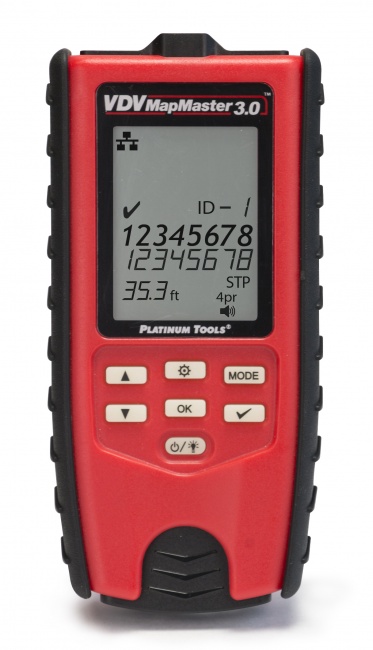
Platinum Tools VDV MapMaster 3.0
Price: ~$330 (kit) | View product
The VDV MapMaster 3.0 is the working installer's default. It tests data, voice, and coax, performs TDR-based length and fault distance measurement, generates an audible tone for tracing, and pairs with numbered ID remotes for cable mapping. The interface is fast -- power on, plug in, read result -- and the build quality survives ladder drops.
The kit version ships with the tester, one remote, the carrying case, and adapter cables; numbered remote sets are a separate purchase. The "true" map function distinguishes it from cheaper testers: it does not just identify which remote is at the far end, it shows the wiremap of the cable at the same time, so you confirm both identification and termination quality in one operation.
Best for: Residential and light commercial installers who need a daily-driver tester for data, voice, and coax. Contractors who value speed and simplicity over advanced features. The most-recommended kit at this price point.
Klein Tools VDV Scout Pro 3
Street price: ~$200 for the kit.
The Klein VDV Scout Pro 3 is the value play. It tests data, voice, and coax with full wiremap, includes TDR length and distance-to-fault, generates a tone, and supports cable mapping via add-on numbered remotes (sold separately or in kit form). The build is rugged in classic Klein style. The interface is straightforward, and the kit includes the basics needed to get started.
What you give up at this price: fewer remotes in the base kit (you typically buy more separately to scale up), no Ethernet speed certification, and no built-in PoE on the base model (the Scout Pro 3 PoE variant adds it for an extra ~$50). For installers who already use Klein hand tools and want consistency, this is a logical pick. For installers who need higher-volume cable mapping, step up to the MapMaster; speed certification is a separate tier and not one CableTestShop lists.
Best for: Klein tool users who want consistent brand experience. Installers on a tight budget who still need full VDV functionality. New installers building a starter kit.
NOYAFA NF-8601 Multifunction Kit
Street price: ~$110 for the kit.
The NOYAFA NF-8601 packs an aggressive feature set into the lowest price tier on this list: wiremap, TDR length, distance to fault, tone generator, eight numbered remote identifiers, port discovery, and an optional PoE detection add-on. It comes in a hard-shell carrying case with all accessories. The color LCD display is bright and easy to read.
The NOYAFA does what it says, but expectations should match the price. Cable length measurements can drift 5-10% versus reference-grade instruments, build quality is a step below Klein and Platinum Tools, and the documentation is translated. For a backup tester, a starter kit, or for tasks where Fluke-grade precision is overkill, the NF-8601 delivers value. For warranty-grade work or daily abuse on commercial jobs, step up.
Best for: Budget-conscious installers, second testers for crews, or contractors who want maximum features per dollar without committing to Fluke or Platinum Tools pricing.
How to Choose: By Use Case
Residential / single-family installer
The VDV MapMaster 3.0 kit is the workhorse here. Cable mapping with numbered ID remotes covers most residential drop counts, the data/voice/coax coverage handles every residential cable type, and the price-to-feature ratio is unbeaten in this segment.
Commercial low-voltage contractor
Commercial work adds two expectations a verification kit does not meet: proof that each drop carries traffic at the rated speed, and a report you can hand over. That is a gigabit speed qualifier's job. We do not currently list one: Platinum Tools discontinued the unit that filled that tier, so proving throughput is a rental or subcontract step rather than a purchase. Pair whatever you use with a separate certifier when warranty documentation is required.
Multi-discipline electrician
The Klein VDV Scout Pro 3 fits well for electricians who occasionally pull data and need verification but spend most of their day on power. Klein's tool ecosystem and the lower price match the use frequency.
New installer or backup tester
The NOYAFA NF-8601 is the entry point. Buy it, learn on it, and if your business grows into commercial work, step up to the MapMaster 3.0 and rent throughput testing when a job calls for it. Keep the NOYAFA in the truck as a backup -- it will earn its keep.
How VDV Testing Fits Your Workflow
The right kit is wasted if it is not used consistently. The most efficient installers we know follow a simple workflow on every job.
1. Test as you terminate. Verify each cable immediately after termination, before moving on. Catching a split pair while the strip and crimp tool is still in your hand is ten times faster than re-locating the run hours later. Use the basic wiremap on the tester for this -- it takes seconds per drop.
2. Map at handover. When all drops are terminated, use numbered remotes to label and document the patch panel. This is where the kit pays for itself. Walk the remotes to each location once, then identify all cables at the panel in a single pass.
3. Document with the customer present. If your tester supports saving or printing results (or you take photos of the screen), have the customer initial the results sheet. This protects you from "the network was working when you left and now it is not" callbacks.
For more on documentation discipline, see our guide on how to read certification reports and our deeper comparison of cable testers vs certifiers.
Related Reading
If you are still narrowing down which class of tester you need, these guides go deeper on specific tradeoffs:
- Best Cable Testers for 2026 -- the broader cable tester landscape, not just VDV kits.
- Cable Tester vs Certifier -- when verification is enough and when you need certification.
- Best PoE Testers -- companion to your VDV kit if you handle PoE installations.
Frequently Asked Questions
What is a VDV tester kit?
A VDV (voice, data, video) tester kit is a multi-cable verification package that tests RJ45 data, RJ11/RJ12 voice, and coaxial cabling in one tool. Kits typically include the main tester, numbered remote identifiers for cable mapping, a tone generator, and a carrying case. They are the standard tool for low-voltage installers in residential and light commercial work.
How many remotes do I need in a VDV kit?
For single-cable verification, one remote is enough. For mapping multiple drops at once (the main reason to buy a kit), six to eight remotes covers most residential clusters. Twelve to twenty remotes serve commercial installers running larger drop groups.
Do I need a separate tone generator if my kit has cable mapping?
If both ends of the cable are accessible, numbered remotes are faster than tone tracing. But for cables behind walls or in unmarked bundles, a tone generator and probe are essential. Most quality VDV kits include both -- check the spec list before buying.
Can a VDV tester certify cable to TIA standards?
No. VDV testers verify and qualify cables but do not perform the frequency-domain measurements required for TIA-568 certification. For warranty-grade certification, you need a dedicated certifier such as a Fluke DSX series or Softing WireXpert.
Is a coax tester actually necessary on residential jobs?
If you install or service CATV, satellite, or coax-fed security cameras, yes. Coax test capability identifies opens, shorts, and bad terminations -- problems that a data-only tester cannot diagnose. Most residential VDV kits include coax testing for exactly this reason.
Assemble Your VDV Kit
Cable testers with numbered remotes, and tone-and-probe sets. We do not sell a pre-packaged VDV bundle, so the kit is assembled: the MapMaster covers wiremap, length, and identification, and the toner covers everything the remotes cannot reach.