What Link Flapping Is and Why It Is Hard
Link flapping is the repeated cycling of an Ethernet link between up and down states. The switch port goes up, the device negotiates a link, traffic flows for some period of time, then the link drops. Sometimes the cycle is fast (seconds to minutes between transitions), sometimes slow (hours to days). Each transition disrupts traffic; the device may have to re-acquire DHCP, re-establish TCP connections, re-authenticate to wireless if it is an AP. The user experience ranges from "the connection feels slow" to "I keep losing internet."
The challenge is that the cause is not always present when you arrive. A cable issue that was making and breaking with temperature stops once the building cools. EMI from a piece of equipment goes silent when the equipment is off. A loose connector seats well enough to look fine when wiggled differently. The problem hides during diagnosis and reappears when you leave.
The right approach is structured: capture historical data so the past behavior is preserved, then run tests that exercise each potential cause systematically.
Categories of Link Flapping Causes
| Category | Typical Symptom Pattern | Typical Frequency |
|---|---|---|
| Intermittent cable break | Flap correlates with cable movement, vibration, temperature | Seconds to minutes |
| Marginal cable performance | Flap correlates with traffic load | Minutes to hours |
| EMI ingress | Flap correlates with nearby equipment cycle | Variable, follows equipment |
| Bad transceiver / SFP | Flap independent of cable, persistent | Random or load-correlated |
| Loose connector | Flap correlates with cable movement | Seconds to days |
| Auto-negotiation mismatch | Flap immediately on link establishment, recurs | Constant |
| Device power management | Flap when device sleeps/wakes | Follows device activity |
| Switch port hardware fault | Flap on one specific port only | Random |
| Ground loop transients | Flap during electrical events (storms, equipment switching) | Sporadic |
| PoE budget exhaustion | Flap when power-hungry feature activates on device | Follows device activity |
The Diagnostic Workflow
Step 1: Pull switch port logs and counters
Before touching anything else, capture what the switch already knows. On a managed switch:
- Link state change history with timestamps (how often does it flap, what time of day)
- Port error counters (CRC errors, alignment errors, runts, collisions, late collisions)
- PoE log entries if applicable (power events, classification changes)
- Negotiated speed and duplex (verify it matches what the device should negotiate)
The flap pattern alone often eliminates several causes. Flapping every few seconds suggests a cable break or auto-neg mismatch. Flapping at 8am every day suggests a building load event. Flapping correlated with thunderstorms suggests a ground loop or surge issue.
Step 2: Verify the cable
Run wiremap and length-to-fault on the cable with a quality wiremap tester. Confirm all 8 conductors pass and there are no splits. Then run qualification testing to validate throughput at the negotiated speed; that instrument is a rental, not something CableTestShop lists. A cable that passes wiremap but fails qualification under load is a strong flapping suspect.
For intermittent issues, wiggle test: flex the cable at suspect points (connector boots, mid-span over equipment) while watching the wiremap result. A connection that drops with flexing is a found fault.
Step 3: Inspect connectors and re-terminate suspect ends
Pull the connector at both ends, inspect under magnification for damaged contacts, stray strands, or loose conductors. Re-terminate any connector that looks marginal. Re-test cable.
Step 4: Verify negotiation settings
On the switch, confirm the port is set to auto-negotiate and the negotiated result matches the device's specifications (Gigabit full duplex for a Gigabit device, etc.). On the device, verify the same. Mismatched hard-coded settings on one end with auto-neg on the other end is a classic flap cause and is fixed in 60 seconds by setting both ends to auto-negotiate.
Step 5: Substitute components
If the workflow has not isolated the cause, substitute. Move the device to a different switch port; if the flap follows the device, the device or cable is at fault. Move a known-good device to the original port; if the new device flaps, the port or cable is at fault. Replace the patch cord with a known-good one. Replace the SFP if present. Each substitution narrows the cause.
Step 6: Check for environmental causes
If you have eliminated cable, connectors, settings, and components and the flap persists, look at the environment: nearby EMI sources, ground loops, temperature variation, vibration. See our guides on EMI interference and ground loop troubleshooting for those workflows.
Special Cases Worth Knowing
PoE devices flapping under power load
A PoE device that boots fine but flaps when its full feature set activates (PTZ camera moving, AP serving wireless clients, IP phone screen lighting up) is often hitting a power budget or voltage drop limit. The link drops because the device browns out. See our PoE testing guide and how to test PoE for the diagnostic workflow.
Energy Efficient Ethernet (EEE) flapping
EEE (802.3az) puts the link into low-power mode during idle periods. Some equipment has poor EEE implementations that cause link drops on transition between active and idle states. Try disabling EEE on both the switch port and device to test.
Storm Control or port security
Switch protective features can shut down a port that exceeds traffic thresholds. Flap pattern: link comes up, traffic spikes, port shuts down (errdisable), recovers automatically, link comes up, repeat. Check switch logs for errdisable entries to identify this case.
Mismatched cable categories
A Cat5e patch cord on a Cat6A run rated for 10G can flap when the link tries to negotiate 10G but cannot maintain it on the Cat5e cord. Verify all components in the channel match the rated speed.
Tools for Link Flap Diagnosis
Wiremap with split-pair detection
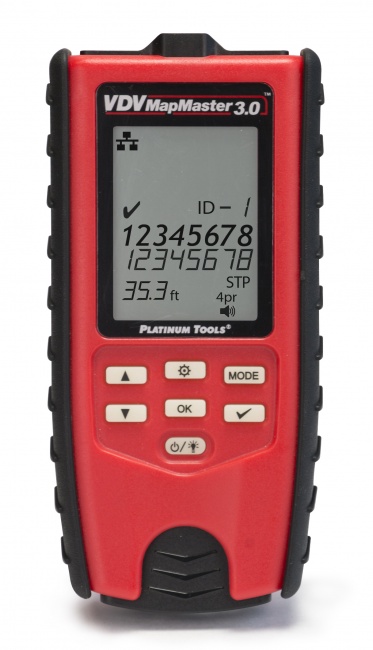
The VDV MapMaster 3.0 finds the cable faults that pass basic LED wiremap testing -- including split pairs that cause Gigabit instability.
Network qualification tester
Finds the performance faults that wiremap alone cannot see, which is the category most flapping links fall into: the cable passes every quiet test and fails under load. CableTestShop does not list a qualifier; a throughput result on a specific job is a rent-or-subcontract step.
PoE tester
For flapping correlated with PoE devices, a PoE tester confirms voltage and wattage delivery at both ends of the cable run. We do not sell one, so this is the card in this grid you fill from another supplier.
General Advice for Flap Calls
- Start with switch data, not the cable. Logs and counters give you context the customer cannot provide
- Capture timestamps -- when does it flap, how often, in what pattern
- Eliminate auto-negotiation issues first. They are free to fix and a common cause
- Test under load, not just at idle. Many flap causes only present when traffic is flowing
- Wiggle test connectors while monitoring -- intermittent connectors are common and easy to miss
- Substitute components methodically when nothing else is found
- Leave monitoring in place if you cannot reproduce on site
For broader troubleshooting context see our guide on cable testers say fail but network works.
Frequently Asked Questions
What is link flapping?
Link flapping is the repeated cycling of an Ethernet link between up and down states. The switch logs frequent link state changes and the device repeatedly establishes and loses connectivity, disrupting traffic during each transition.
How do I find the cause of link flapping?
Use a structured workflow: capture switch port logs and counters first, then verify the cable, check transceivers and connectors, verify negotiation settings, check for device power management, and finally check environmental causes like EMI and ground loops.
Can a bad cable cause link flapping?
Yes, frequently. Intermittent connector breaks, marginal cable performance, EMI ingress, and shield ground loops all cause flapping. A cable that passes a quiet wiremap test can still cause flapping under operating conditions, which is why qualification testing under load is more diagnostic.
What about switch port settings?
Mismatched duplex or speed between switch and device is a classic flapping cause. Always set both sides to auto-negotiate for modern Ethernet equipment, or hard-code matched settings on both ends explicitly.
Tools That Catch Flapping Causes
Wiremap and parametric tools that narrow an intermittent link fast. We do not sell a PoE tester, so if the flapping tracks a powered device you will source that instrument elsewhere, and you will still want the cable proved first.