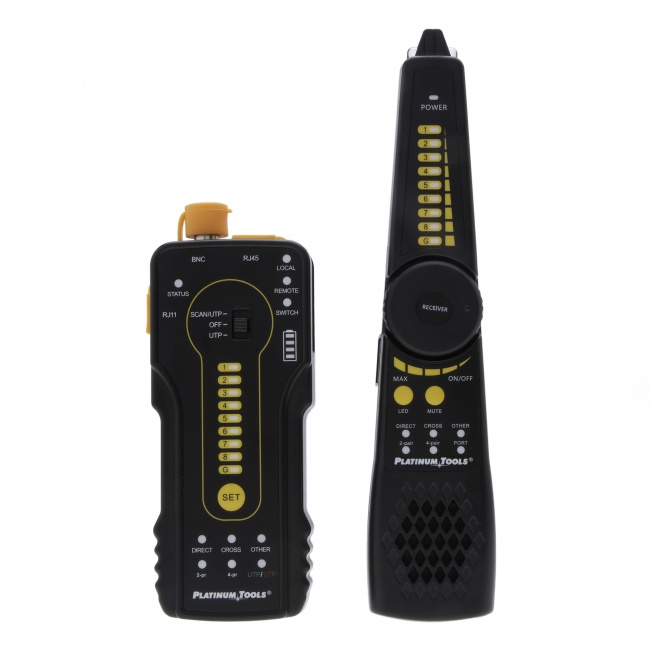
Start at the Switch, Move Toward the Device
The number one mistake in PoE troubleshooting is starting at the dead device. The dead device tells you nothing -- it could be a switch problem, a cable problem, a device problem, or any combination. The diagnostic procedure must work from the power source outward: confirm the switch is delivering power, confirm the cable is delivering power, then test the device.
Skipping this order wastes hours. A swapped camera, a swapped patch cord, a port reset on the switch -- you can chase these all afternoon and never find the actual fault. A PoE tester at three points along the run finds the problem in five minutes.
The Three Test Points
| Test Point | What It Confirms | If It Fails |
|---|---|---|
| 1. Switch port | Switch is delivering correct PoE class and voltage | Switch port disabled, budget exhausted, hardware fault |
| 2. Far end of run | Cable delivers acceptable voltage and wattage to device | Cable resistance, bad termination, length, damage |
| 3. Device under load | Device draws power and operates normally | Device PoE input failed, class mismatch, internal short |
The procedure is the same regardless of the device type. Every PoE failure breaks down into one of these three test points, and finding which one fails tells you exactly what to fix.
Step 1: Test the Switch Port
Disconnect the patch cable that runs to the dead device. Connect a PoE tester directly to the switch port using a short, known-good patch cable.
What you should see
- The tester reports a PoE class (e.g., 802.3at Class 4, 30W)
- Voltage reads in the standards-compliant range (44-57V for af, 50-57V for at/bt)
- The tester displays which pairs are carrying power
What you should not see
- "No PoE detected" -- the port is not delivering power
- Voltage below 44V -- power supply or aging switch problem
- Class 0 when the port should be Class 4 -- per-port settings have limited the port
If the switch port test fails, the problem is at the switch. Check that PoE is enabled on that specific port (most managed switches have per-port PoE enable/disable). Check the switch's PoE budget under "show power inline" or equivalent and add up the wattage allocated to all powered ports -- if the total approaches or exceeds the budget, the switch will refuse to power additional ports or shed lower-priority ports. See our PoE budget guide for the math.
Step 2: Test the Far End of the Cable
If the switch port passes the test, move the PoE tester to the far end of the installed cable run. Connect the tester at the wall plate, ceiling jack, or wherever the device normally lives.
Compare voltage at the device end to switch port voltage
Voltage drop across the cable run reveals cable problems. A run that drops 1-3V is healthy. A run that drops 5V or more is suspect. A run that drops 8V or more is failing.
Causes of excessive voltage drop
- Poor terminations -- the most common cause. High-resistance contacts at RJ45 connectors, keystones, or patch panels create localized voltage loss. Re-terminate both ends and retest.
- Excessive cable length -- past 90 meters, voltage drop on 24 AWG Cat5e becomes problematic for higher-power PoE. Measure cable length with a TDR-equipped tester.
- Copper-clad aluminum (CCA) cable -- non-compliant cable with ~50% higher DC resistance than solid copper. If you find CCA on a PoE site, replacing the cable is faster than troubleshooting it. See our voltage drop deep dive.
- Damaged conductors -- crushed cable, kinks, or cuts that reduce the effective conductor area.
If the far-end test fails
Test the wiremap with a VDV MapMaster 3.0 or LanSeeker. A pair fault that does not affect data may eliminate one of the PoE power conductors entirely. For 802.3bt installs, all four pairs must be intact.
Step 3: Test the Device
If the switch and cable both pass, the failure is at the device. The PoE tester confirms power is arriving correctly at the right voltage and wattage -- if the device still does not power on, its PoE input circuitry has failed.
Common device-side failures
- Surge damage -- nearby lightning strike or power transient destroyed the device's PoE input. Most common on outdoor cameras and access points.
- Class mismatch -- the device requires Class 4 (PoE+) but the switch is configured for Class 3 (PoE). The device powers up briefly then shuts down when it tries to draw beyond what the port allows.
- Failed signature resistor -- the small resistor inside the device that identifies it as a valid PD has failed. The switch refuses to apply voltage because it sees no PD.
- Polarity-sensitive PoE -- some passive PoE devices require specific Mode A or Mode B power. A switch using the other mode will appear powered to a tester but not to the device.
To confirm device failure, swap in a known-good replacement device and test. If the replacement powers on with the same cable and switch port, the original device is dead. If the replacement also fails, recheck steps 1 and 2 -- you may have missed an intermittent fault.
Quick Diagnosis: Symptom to Likely Cause
| Symptom | Most Likely Cause | Test |
|---|---|---|
| No power at all | Port disabled or budget exhausted | PoE tester at switch |
| Powers on then dies | Class mismatch or budget shed | Wattage test under load |
| Reboots randomly | Voltage drop or marginal cable | Voltage at device under load |
| Works on bench, fails installed | Cable resistance or termination | Voltage drop measurement |
| Used to work, now does not | Switch budget exceeded after device added | Sum allocated wattage vs budget |
| Multiple devices fail simultaneously | Switch power supply or budget | Test all switch ports |
| Camera works, NVR sees nothing | PoE works but data does not | Wiremap and link speed |
Tools for Field PoE Diagnosis
PoE Tester
The workhorse of this whole procedure. Identifies the PoE class, displays voltage and wattage, fits in a shirt pocket. If you only add one instrument for PoE work, it is this one.
Wiremap Tester
The VDV MapMaster 3.0 verifies all 8 conductors and detects pair faults that PoE will fail on. Run wiremap testing whenever the cable is suspected.
Tone and Probe
The Digital Tone and Probe identifies which port at the patch panel corresponds to the dead jack, so you can verify the right switch port before testing.
For more on the standard PoE testing procedure, see how to test PoE and the complete PoE testing guide.
Things People Forget
Cable that worked before may not work now
Buildings settle, cables get pinched in renovation work, ceiling tiles crush them, and rodents chew them. A cable that delivered 802.3af for years may have developed a fault that breaks 802.3bt's all-four-pairs requirement. "Nothing changed" is rarely true.
Patch cables count
The patch cable from the wall plate to the device is part of the run. Cheap, damaged, or non-compliant patch cables cause real PoE problems. When troubleshooting, replace patch cables with known-good factory units to eliminate them as a variable.
Switch firmware can change PoE behavior
A firmware update can change default per-port PoE settings, alter budget allocation algorithms, or introduce class detection bugs. If PoE failures appear after a switch update, the firmware is suspect -- check the vendor's release notes and known issues.
Daisy-chained PoE through second hops
Some installations run a second PoE switch off a PoE+ uplink to power downstream devices. This rarely works for high-power loads -- the uplink port cannot supply enough wattage to feed a PoE switch with multiple connected devices. If you find a small PoE switch in a closet with a single uplink, treat the whole closet as one budget question.
Frequently Asked Questions
Why is my PoE device not powering on?
Four most common causes: PoE disabled on the switch port, switch PoE budget exhausted, cable fault on power-carrying pairs, or the device requires a higher PoE class than the port provides. A PoE tester at the device end isolates the cause in under a minute by reporting voltage, class, and wattage.
How do I test if a switch port is delivering PoE?
Connect a PoE tester directly to the switch port with a known-good short patch cable. The tester performs the IEEE 802.3 detection handshake and reports the class, voltage, and wattage if power is present. If no power is reported, the issue is at the switch -- port disabled, budget exhausted, or hardware failure.
Can a bad cable cause PoE to fail even though data still works?
Yes. Ethernet data only requires two pairs and tolerates moderate signal degradation. PoE is raw DC -- cable resistance directly reduces what reaches the device. A cable with one damaged pair, poor terminations, or excessive length can pass continuity and deliver gigabit data while failing to provide enough voltage for a PoE+ camera under load.
What does it mean when the switch shows PoE enabled but no power flows?
The switch is not detecting a valid PD signature on the port. Causes include a break on the detection pair, the device is not actually PoE-capable, the device's signature resistor has failed, or the cable run is too long for reliable signature detection. A PoE tester presents a known-good signature and forces the port to deliver power, which isolates whether the issue is the device or the switch detection logic.
How do I troubleshoot intermittent PoE that works sometimes?
Measure voltage at the device under load. If voltage drops below the spec minimum when the device is active, you have a voltage drop problem from cable resistance. If multiple devices fail when load increases, the switch budget is exhausted. If the device works in cool temperatures and fails when warm, the cable run is in a hot space -- conductor resistance rises with temperature.
Diagnose PoE Faults in Minutes, Not Hours
We do not sell a PoE tester. What we do sell tests the cable underneath the power: wiremap, continuity, length, and distance to fault. Source the PoE tester from a supplier who stocks one, and prove the cable first, because a split pair or a bad termination will fail PoE for a reason no PoE tester will ever name. The one thing we stock that touches the power itself is the Digital Tone & Probe Kit: its powered-device mode uses four LEDs to show which pairs a port is powering. That is detection, not measurement, so it will not give you voltage, wattage, or class.