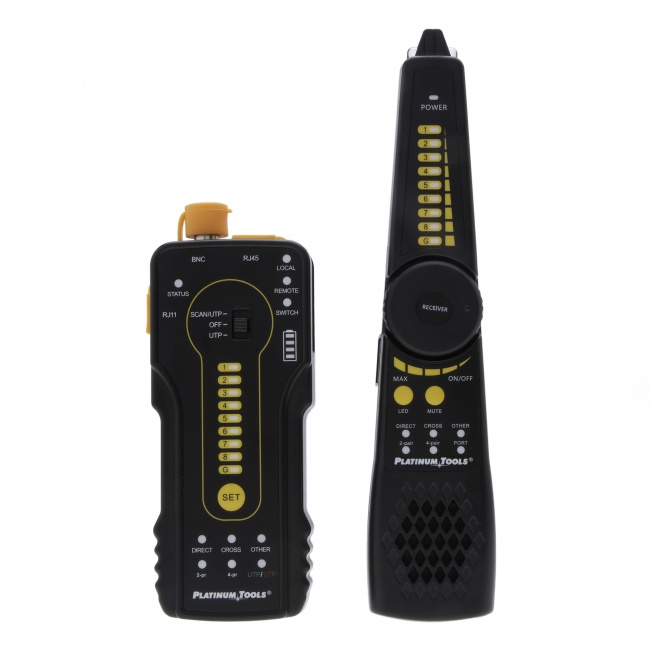
Why IP Camera Cable Plants Fail
IP cameras are unforgiving devices to cable for. Three things drive most field failures, and all three are testable before the install closes out.
- PoE under load. The camera boots fine but resets when IR illumination kicks in at dusk because the wattage budget collapses on a long marginal cable.
- Distance. 100m is more aspirational than guaranteed. Field runs that look like 90m on the as-built come in at 95m+ with patch cords and don't have margin for PoE++.
- Environmental. Outdoor cables degrade. Indoor cables in mechanical spaces get crushed and abraded. The camera works for six months, then drops out, and the troubleshooting points back to a cable issue that was already marginal at install.
The cable test checklist below catches all three before the site is signed off.
Cable Category and PoE Class by Camera Type
| Camera Type | Resolution | PoE Class | Recommended Cable |
|---|---|---|---|
| Fixed Indoor | 1080p / 2MP | Class 2 (7W) | Cat6 UTP plenum |
| Fixed 4K Indoor | 4K / 8MP | Class 3 (13W) | Cat6A UTP plenum |
| Outdoor Bullet w/ IR | 2-8MP | Class 3-4 (13-25W) | Cat6A STP outdoor |
| Indoor PTZ | 2-8MP | Class 4 (25W) | Cat6A UTP plenum |
| Outdoor PTZ w/ Heater | 2-8MP | Class 6 (51W) | Cat6A STP outdoor |
| Thermal / Specialty | Variable | Class 6-8 (51-71W) | Cat6A STP outdoor |
Specify by worst-case load. A camera with optional IR illumination should be cabled for the IR-on case, not the IR-off case. Saving cable cost by under-specifying produces field calls.
The Field Test Checklist
1. Wiremap and Continuity (every cable)
Verify pin-to-pin wiring at both ends, no shorts, no opens, no split pairs. The VDV MapMaster 3.0 with cable ID remotes lets one technician verify a row of camera drops without coordination. Catch wiremap errors before mounting cameras.
2. Cable Length
Measure actual length and compare to spec. Cables that exceed 90m permanent link will not certify and will likely have PoE issues at full load. Long runs need either a closer IDF or a fiber/copper hybrid path with media conversion.
3. Permanent Link Certification
Run TIA-568.2-D Cat6 or Cat6A permanent link cert on every camera drop. Document the cable ID and PASS result. This is the contractual deliverable in commercial installs and the troubleshooting baseline in residential or small commercial installs.
4. PoE Class Negotiation
Use a PoE tester at the camera end to verify the cable supports the negotiated PoE class. The tester should request the specific class the camera will use (Class 4, Class 6, etc.) and report the voltage at the camera end under load.
5. PoE Under Sustained Load
Many camera failures only appear under sustained peak load. After class negotiation, run a sustained load test that mimics camera with IR on, heater on, and motors active. The cable that passes class negotiation but drops voltage under sustained load is a future field call.
6. Throughput Validation
Validate actual data throughput on each drop with a qualifier. A camera streaming 4K H.265 at 30 fps needs sustained throughput; cable issues that are invisible to a class negotiation test show up here as packet retransmits or speed downgrades. CableTestShop does not list a qualifier, so budget this step as a rental or a subcontracted test.
7. Environmental Inspection
Walk the cable path. Look for tight bends, abrasion against metal edges, missing cable supports, water ingress points on outdoor runs. Document any concerns with photos for the close-out package.
8. Switch Port Verification
At the IDF, verify each cable terminates to the planned switch port and that the port is delivering the expected PoE budget. The LanSeeker at the camera end shows link speed, duplex, and PoE class without requiring switch CLI access.
9. Camera Boot and Streaming
After cable cert and PoE verification, mount the camera, power it from the planned switch port, and verify it joins the VMS. Watch for boot loops, IR cycling, and heater-induced drops. Any of these indicate a cable or PoE budget issue, not a camera issue.
10. Documentation
Each camera gets a result block: cable ID, switch port, PoE class result, throughput result, and operator initials. The integrator's close-out package binds this with the as-built drawing and the camera asset list.
Outdoor Camera Cable Specifics
Outdoor camera cables face conditions that indoor cables do not. The test workflow expands accordingly.
- UV-rated jackets. Verify cable is rated for the UV exposure. Standard plenum cable degrades quickly outdoors.
- Surge protection. Every outdoor cable run needs surge protection between the camera and the IDF. Test cable performance with the SPD inline; some SPDs introduce impedance that affects high-frequency parameters.
- Drip loops and entry seals. Verify no water ingress paths at building penetrations.
- Ground bonding. Outdoor cable shields and camera mount points must be bonded to the building ground per NEC. Test ground continuity.
- Aerial run verification. Suspended cables between buildings need messenger support and strain relief at both ends. Verify physically; cable that looks fine at install will fail under ice load.
Tools for IP Camera Cable Testing
- VDV MapMaster 3.0 for wiremap and ID across multiple drops
- LanSeeker for split-pair and reversal faults, read at the camera end and the closet end simultaneously
- A rented qualifier for throughput validation under load
- Digital Tone & Probe for tracing through ceilings and shared conduit
- A Cat6A-rated certifier for full TIA permanent link acceptance
For more on PoE testing specifically, see our PoE testing guide, our how to test PoE walkthrough, and the best PoE testers 2026 roundup.
Frequently Asked Questions
What cable category should I use for IP cameras?
Cat6 is the practical floor for IP camera installs in 2026, with Cat6A specified for higher-end installs and any camera that requires PoE++. The cable must be rated for the install environment: plenum for ceiling spaces, outdoor-rated for exterior runs, riser-rated for vertical runs.
How far can I run an IP camera cable?
Standard Ethernet 100 meters (328 ft) applies. Beyond 100m, options are: PoE extender, media converter pair to fiber for the long run, or relocate the IDF closer to the camera cluster.
What PoE class do IP cameras need?
Fixed-position 1080p cameras typically draw PoE Class 2. 4K cameras with built-in IR illuminators draw Class 3. PTZ cameras with heater can draw Class 4 or Class 6. Verify the exact PoE budget with the camera spec before sizing the switch and the cable.
Should outdoor camera cables be tested differently than indoor?
Outdoor camera cables face temperature extremes, UV exposure, water ingress, and lightning surge risk. Cable category and TIA cert remain the same, but additional verification is required: cable jacket condition, all penetrations sealed, surge protection devices verified.
What is the most common IP camera cable failure?
PoE failure on long runs is the most common field-reported camera cable problem. The cable certifies electrically and the camera boots, but the camera resets when it tries to enable IR illumination or heater. Test PoE under load with a tester that draws the rated wattage.
Tools for IP Camera Cable Work
We do not sell a PoE tester. What we do sell tests the cable underneath the power: wiremap, continuity, length, and distance to fault. Source the PoE tester from a supplier who stocks one, and prove the cable first, because a split pair or a bad termination will fail PoE for a reason no PoE tester will ever name.