The Definitions, Made Concrete
Both opens and shorts are defects in the electrical path of a cable. They differ in the type of defect.
Open
An open is a missing connection. A conductor that should carry signal from one connector to the other is broken somewhere along the path. Current cannot flow because the path is interrupted. The break can be at the connector contact (a pin not making contact with the conductor), inside the connector body (a conductor that did not seat into the insulation displacement), at a punch-down (a conductor that pulled out of the IDC slot), or anywhere along the cable run (a wire physically broken inside the cable).
Short
A short is an unintended connection. Two conductors that should be electrically isolated from each other are touching. Current can flow between them when it should not. Shorts can occur inside a connector (two pins or two conductors making contact), at a punch-down (adjacent IDC slots that have been bridged), or in the cable itself (insulation damage allowing two conductors to contact each other or the shield).
How Each Failure Appears on a Wiremap Tester
Open
On a wiremap tester display, an open shows as a missing connection on one or more pins. The remote unit at the far end fails to detect the test signal on the open pin. Different testers display this in different ways:
- LED testers: the LED for the open pin does not light, or shows a fault color
- Digital wiremap displays: the affected pin shows as blank, dashed, or labeled "open"
- Length-to-fault function: reports the distance from your end to the break
Short
On a wiremap tester display, a short shows as multiple pins reporting the same destination. Two or more conductors that should be electrically isolated are connected to each other.
- LED testers: two LEDs light at the same time when only one should be active
- Digital wiremap displays: multiple pins show the same number or are labeled "shorted"
- Some testers display "X-Y short" specifically identifying which two pins are bridged
A quality wiremap tester distinguishes opens from shorts unambiguously. Cheap LED-only testers can be ambiguous about complex faults like a short combined with an open on the same pair -- another reason to invest in a tester with a clear digital display.
Causes of Each Fault Type
| Fault Type | Likely Causes | Where to Look First |
|---|---|---|
| Open at endpoint | Conductor not seated, IDC contact failure, broken pin | Re-terminate at end indicated by length-to-fault |
| Open mid-span | Cable cut, severe crush, rodent damage, pulled connector that ripped a conductor | Tone and trace to the location reported by length-to-fault |
| Open multiple conductors | Cable severed completely, connector ripped off both ends | Inspect for visible damage; pull new cable likely required |
| Pin-to-pin short at endpoint | Connector damaged, conductor strand stray, IDC bridge | Inspect connector under magnification; re-terminate |
| Pin-to-pin short mid-span | Insulation crushed allowing conductor contact | Tone and trace to the location reported by length-to-fault |
| Conductor-to-shield short | Shielded cable with insulation damage; foil contacting conductor at termination | Inspect for shield drain wire pinch; re-terminate |
| Multiple opens AND shorts | Severe physical damage (crush, rodent, machinery) | Pull new cable |
Diagnosis Workflow: Open
Step 1: Localize with length-to-fault
If your tester has length-to-fault on opens, the displayed distance is the most efficient single piece of information. A reading of 1 to 3 feet means the fault is at the connector you are plugged into. A reading near the cable's full length means the fault is at the far end. A reading in the middle means mid-span damage.
Step 2: Re-terminate the indicated end first
If the fault is at one of the endpoints, cut the connector off, re-strip, and re-terminate. Most opens at the endpoint are caused by a single conductor that failed to seat properly during the original termination. The re-termination fixes it 90% of the time.
Step 3: Inspect mid-span if needed
If the open is mid-span, use a tone-and-trace set to physically locate the fault zone. The probe will track tone along the cable until it reaches the open, where the signal disappears or changes character.
Step 4: Repair or replace
If the mid-span damage is accessible (cable in cable tray, ceiling, or under floor), you can splice a new section in place. If the damage is inside a wall or in an inaccessible run, pull a new cable. Splices on twisted pair degrade high-speed performance even when done well; re-pulling is the cleaner option for Gigabit and faster applications.
Diagnosis Workflow: Short
Step 1: Identify which pins are shorted
The wiremap tester reports which pins are shorted together (e.g., "pin 3 and pin 6 shorted"). Note the pair affected -- pin 3-6 is the green pair on T568B, pins 1-2 are the orange pair, and so on.
Step 2: Localize with length-to-fault
If your tester offers length-to-fault on shorts (some only do opens), the distance reading localizes the fault. Some testers report the short location with different accuracy than open location -- check your tester's documentation.
Step 3: Inspect connector first
Most shorts are at the connector. Cut the connector off, inspect the cable end visually for stray strands or damaged insulation, re-strip, and re-terminate. Stray strands of stranded conductor on patch cord ends are a common cause -- a single fine strand bridging two contacts.
Step 4: If short persists, inspect cable
If both connectors test fine after re-termination but the short persists, the cable itself is damaged. Use the length-to-fault distance to find the damage. Common mid-span short causes: a screw or staple driven through the cable, a tile drop crushing the cable, or a tight bend that has cracked the inner insulation.
Symptom Patterns That Hint at Open vs Short
Sometimes you do not have a tester immediately available and need to guess at the fault type from symptoms. The patterns are different:
Open symptom patterns
- No link light at all (open on a critical pair)
- Link light but very low speed (open on one of the four Gigabit pairs)
- PoE device fails to power on but data works (open on power pairs only)
- Intermittent connectivity that correlates with cable movement (an open that is making and breaking)
Short symptom patterns
- Link light flickers or stays off (short causing protocol failures)
- Switch port logs report excessive errors or drops the port
- PoE device powers on then immediately powers off (short causing PSE protection trip)
- Intermittent connectivity that correlates with temperature (thermal expansion making and breaking the short)
For more on diagnosing intermittent issues see our guide on Ethernet link flapping diagnosis.
Tools for Open and Short Diagnosis
Wiremap tester with length-to-fault
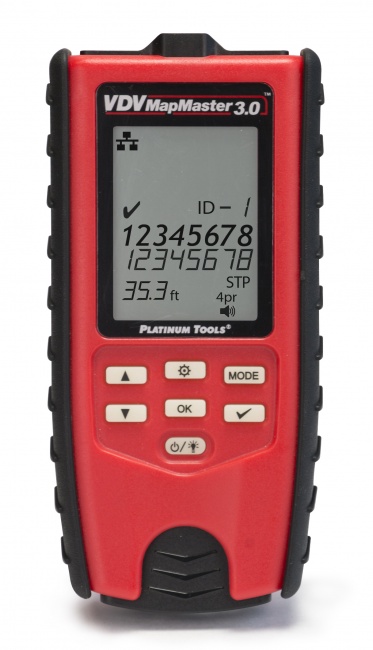
The VDV MapMaster 3.0 identifies opens, shorts, miswires, and split pairs, and reports distance to fault on opens and shorts. The single most useful tool for this work.
Tone generator and probe
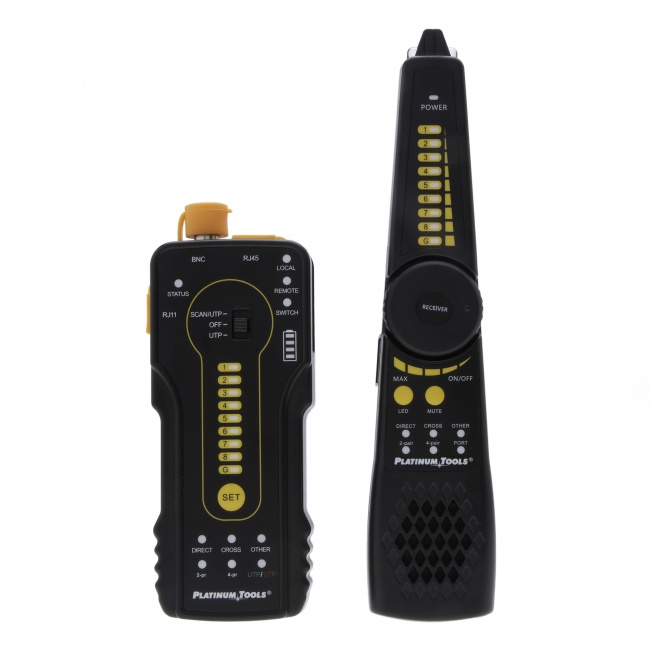
For locating mid-span faults physically, a digital tone-and-probe set is essential. Place tone on the affected conductor and trace it until the tone disappears or changes character at the fault.
Network qualification tester
Answers the case this article does not: the wiremap passes cleanly and the link is still degraded, so the fault is performance rather than continuity. CableTestShop does not list a qualifier; a throughput result on a specific job is a rent-or-subcontract step.
Frequently Asked Questions
What is an open on a network cable?
An open is a break in electrical continuity. The conductor is interrupted somewhere between the two connectors and no current can flow. On a wiremap test, an open shows as a missing connection on one or more pins.
What is a short on a network cable?
A short is an unintended connection between two conductors. Common causes are damaged connectors, bridged punch-downs, and crushed cable. On a wiremap, a short shows two or more pins reporting the same connection.
How do I tell if I have an open or a short?
A wiremap tester reports both. Opens appear as missing connections; shorts appear as multiple pins reporting the same connection. With a multimeter, an open shows infinite resistance between the two ends of the conductor; a short shows near-zero resistance between conductors that should be isolated.
Why is my PoE device down but my data still works?
Different protocols use different conductor pairs. If a fault breaks the pair carrying PoE but leaves the data pair intact, you see working data but failed PoE. Test all 8 conductors. See our PoE testing guide for more.
Find Opens and Shorts in Minutes
Wiremap testers, length-to-fault tools, and tone-and-trace sets that turn fault diagnosis into a 5-minute exercise.