What an MDU Cable Plant Looks Like in 2026
An MDU cable plant looks like a hotel cable plant compressed into a residential footprint. Every unit gets multiple drops. Common areas have dense AP coverage. The MPOE (Minimum Point of Entry) holds the ISP demarc and the property's MDF. Each floor or wing has an IDF. Hundreds or thousands of cables converge.
Typical density for a 200-unit apartment building:
- 400-800 horizontal copper drops to units (2-4 per unit)
- 30-50 common area APs (corridors, gym, lounge, pool, leasing office)
- 15-25 IP cameras (entrances, parking, common areas)
- 20-40 access control points (entry doors, elevator readers, package room)
- 1 MPOE / MDF and 4-8 IDFs
For student housing or luxury MDU with bulk-managed Wi-Fi, multiply AP and drop counts by 1.5-2x.
MDU Service Models Drive Cable Design
The way Internet service is delivered to residents shapes what cable plant the property needs. Three service models dominate.
| Model | Resident Choice | Unit Drops | Common Area APs |
|---|---|---|---|
| ISP-by-resident | Each resident picks ISP | 1-2 per unit | Limited |
| Bulk-managed Wi-Fi | Property provides Wi-Fi | 2-4 per unit + AP | Heavy density |
| Bulk + smart building | Property provides everything | 3-6 per unit | Heavy density + IoT |
Bulk-managed Wi-Fi is the dominant model in new construction because it lets the property control resident experience and use it as an amenity. The cable plant scales accordingly.
MDU Cable Plant Standards
MDU cable plants are governed by a stack of standards and property-specific requirements.
ANSI/TIA-570-D (Residential Telecommunications)
The residential telecom standard. Defines cable types, topology, and outlet placement for single-family and MDU residential. Provides the framework for in-unit cabling.
ANSI/TIA-568.2-D (Performance Standard)
The performance and test standard cited by 570-D for any twisted-pair cabling. Cat6A permanent link is the typical certification limit.
FCC Part 76 (MDU Wiring)
Federal rules governing how ISPs and the property share access to in-building wiring. Affects who installs and who owns specific cable segments.
Property Owner Standard
Most multi-property owners (REITs, large apartment operators, student housing companies) have an internal IT/cabling standard that supersedes generic specifications. Pull it before the bid.
MDU Test Plan by Zone
MPOE / MDF
Document the ISP demarc clearly. Property cable starts on the building side of the demarc. The MDF holds the property's switch fabric, the bulk-Wi-Fi controller (if applicable), and the head-end for any TV or IPTV system. Cable certification covers everything from MDF to IDF and from MDF to common area APs.
IDF Per Floor or Wing
Each IDF holds the patch panels for its serving area. Distance from the IDF to the farthest unit must stay inside the 90m permanent link budget. Verify on a floor plan with measured distances, not estimates.
Unit Drops
Each unit gets a documented set of drops with a unit-keyed cable ID (e.g., 0214-DATA-A for unit 214 data drop A). The cable cert deliverable groups results by unit number. Property managers and future ISPs use the unit number as the lookup key.
Common Area APs
Dense AP coverage in corridors, lounges, gyms, leasing office, pool deck, and any common amenity. PoE class verification on every AP cable. Cat6A is mandatory for Wi-Fi 6E density.
IP Cameras and Access Control
Standard PoE-fed surveillance and access drops. Tested per the surveillance camera and door access workflow.
Unit Drop Test Workflow
1. Cable ID and Pre-Pull
Before pulling, the cable ID for each unit drop is loaded into the certifier's project file. The label scheme is documented in the property turnover package.
2. Pull and Terminate
Pull through the planned riser and unit penetration. Terminate at the IDF patch panel and the unit wall plate. Verify with the VDV MapMaster 3.0 as you go to catch wiremap errors immediately.
3. Permanent Link Certification
Run TIA-568.2-D Cat6A permanent link cert on every unit drop. Document the cable ID, length, and PASS result. Group results by unit in the deliverable file.
4. PoE Class Verification (where applicable)
For drops that will power an in-unit AP, IPTV, or smart home hub, verify PoE class delivery at the unit end under load.
5. Throughput Validation
For high-end or bulk-managed properties, validate throughput at each unit drop at gigabit speed. CableTestShop does not list a qualifier, so budget this step as a rental or a subcontracted test.
6. Documentation
Each unit gets its own page in the cert deliverable: unit number, drop count, panel ports, certification results, PoE results, operator signature.
Common Area AP and Camera Workflow
Common area cabling looks more like commercial work than residential. APs in corridors, ballrooms, and amenity spaces need the same testing rigor as a hotel or office build.
- AP placement modeled before pull. Wireless coverage drives AP placement; cable runs follow. Wi-Fi predictive design (Ekahau, iBwave) drives the placement and pathway.
- PoE++ for high-end APs. Wi-Fi 6E and Wi-Fi 7 APs need Type 4 PoE. Test under load.
- Surveillance and access cables tested per the camera and access workflows.
- Outdoor amenity cabling. Pool decks, parking gates, exterior cameras need outdoor-rated cable and surge protection on every run.
Property Owner Turnover Package
The MDU cable cert deliverable becomes part of the property's permanent records. It is referenced for tenant turnover, future refresh work, and property sale due diligence. Build it to last.
- Cover summary with property name, address, date range, drop count, PASS count
- By unit pages keyed to apartment or unit numbers
- Common area section with AP, camera, and access drops grouped by location
- MDF and IDF rack elevations with port assignments
- As-built drawings updated with every cable run and panel
- Cable BOM with manufacturer, part number, lot, warranty registration
- Certifier calibration certificate for the test period
- ISP demarc location and ownership boundary clearly documented
- Digital format suitable for future property management system upload
Tools for MDU Cable Work
- VDV MapMaster 3.0 with multiple remotes for unit-by-unit verification
- LanSeeker for switch port and PoE verification at the unit or AP end
- A rented qualifier for throughput validation on high-end and bulk-managed properties
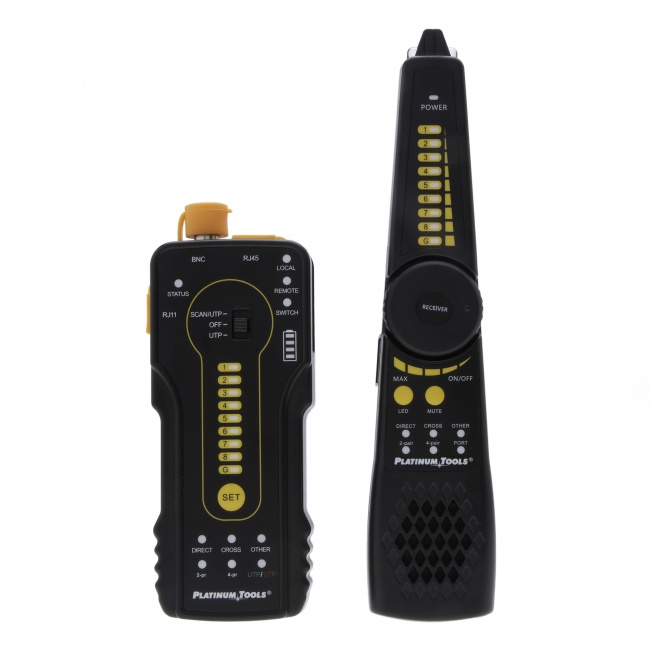
- Digital Tone & Probe for tracing through risers and shared pathways
- A Cat6A-rated certifier for full TIA permanent link acceptance
Background reading: our guide to certification reports and cable tester vs certifier comparison. For PoE specifics, see the PoE testing guide.
Frequently Asked Questions
What is bulk-managed Wi-Fi in MDU and how does it affect cabling?
Bulk-managed Wi-Fi is a property-wide wireless network where the building owner provides Internet to every unit through a single managed system. Every unit needs at least one PoE-capable AP cable, common areas need dense AP coverage, and Cat6A is typically required throughout because of the AP density and traffic load.
Who owns the cable plant in a typical MDU and who is responsible for certification?
In most new MDU construction, the property owner owns the in-building cable plant from the MPOE through the unit drops. The property owner is responsible for installation and certification of the in-building plant. Always confirm the demarc point in writing before the project starts.
What cable category should new MDU properties install?
Cat6A is the practical floor for new MDU construction in 2026. For high-end or smart-building MDUs, Cat6A throughout with multiple drops per unit is standard. Fiber to each unit is increasingly specified for luxury and student housing.
How are unit drops tested in an occupied MDU during a refresh?
Refresh work in occupied MDUs is sequenced unit-by-unit with resident notification and access scheduling. Plan for 30-60 minutes per unit including access, test, and documentation. Build a 10-15% return-visit buffer into the schedule.
What documentation does a property owner need at MDU cable plant turnover?
An MDU cable plant turnover package includes cable certification reports for every drop, an as-built drawing, a unit-by-unit cable schedule keyed to apartment numbers, labeled rack elevations, the cable bill of materials, and a one-page summary by floor.
Tools for MDU Cable Work
Equip your MDU cabling team with the right verification, qualification, and certification tools.