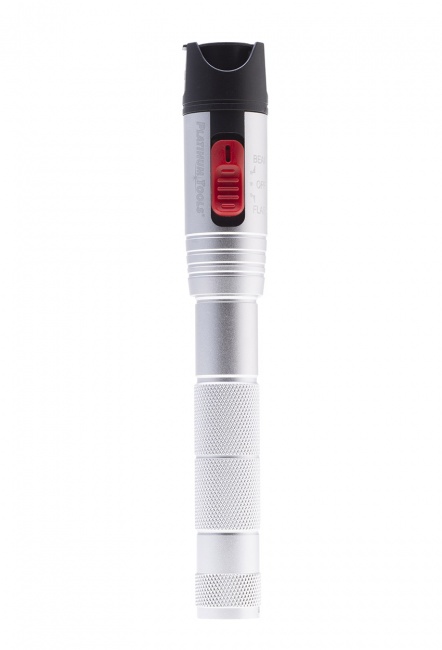
The Short Answer
The Two Tiers of Fiber Testing
TIA-568 splits fiber acceptance testing into two tiers. Each tier answers a different question and uses different equipment.
Tier 1: Insertion Loss (Power Meter and Light Source)
Tier 1 testing measures the total optical loss across the entire link, end to end. A calibrated light source is connected at one end of the fiber. A calibrated power meter is connected at the other end. The meter reads the received power in dBm. Subtract that from the reference (the transmitted power measured directly into the meter through the same patch cords) and you have the link's insertion loss in dB.
Tier 1 produces a single number per fiber per wavelength. Compared against the calculated loss budget, it tells you pass or fail. It does not tell you where the loss occurs along the fiber. For a 200-meter run with three connectors and one splice, Tier 1 cannot distinguish between a bad connector and a bad splice -- only that the total is acceptable or not.
Tier 1 is the minimum acceptance test required by TIA-568.3-D for premises fiber installations. It is sufficient for the majority of enterprise installations.
Tier 2: Event Analysis (OTDR)
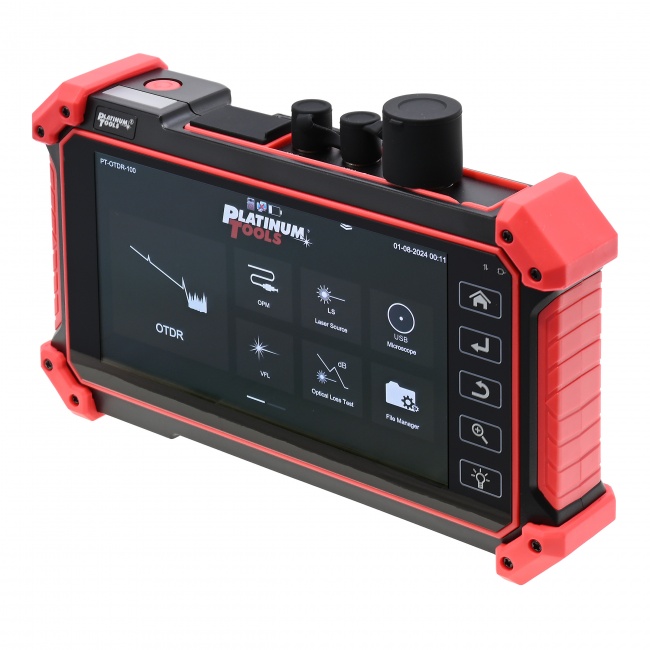
Tier 2 testing uses an Optical Time-Domain Reflectometer to send pulses of light down the fiber and measure the reflections that come back. The OTDR builds a trace of the entire fiber path showing every connector, splice, bend, and break, with the loss of each event called out individually.
Tier 2 is required for outside-plant fiber where you need to verify splice quality, locate buried fiber faults, or confirm that the cable plant matches the as-built drawings. It is also required when contract specifications mandate it -- typically large data center, government, or carrier projects.
Tier 2 is more expensive (OTDRs run $5,000 to $30,000+) and requires more skill to interpret. Most contractors rent OTDRs for jobs that need them.
Side-by-side comparison
| Capability | Tier 1 (Power Meter + Source) | Tier 2 (OTDR) |
|---|---|---|
| Total link loss | Yes (primary measurement) | Yes (calculated from trace) |
| Loss per connector | No | Yes |
| Loss per splice | No | Yes |
| Distance to fault | No | Yes (within meters) |
| Reflectance per event | No | Yes |
| Required for warranty | Almost always | Sometimes (project spec) |
| Test time per fiber | 10-30 seconds | 30-90 seconds |
| Skill level needed | Moderate | High |
| Equipment cost | $1,500-$5,000 | $5,000-$30,000 |
Tier 1 Procedure: Power Meter and Light Source
The Tier 1 test is bidirectional: you measure loss in both directions and average the results. This averages out connector mating variability and is required by TIA-568.
1. Set the reference
Before the link is connected, you must establish a reference power level. Connect the light source directly to the power meter with the test patch cords (one cord, two cords, or three cords -- the method depends on which TIA reference standard your test report cites). Note the reference value in dBm at each test wavelength. This is your zero loss baseline.
The reference must be re-set at the start of every shift, after any cable swap, and any time the fiber endface contamination is in question. Drift between measurements caused by an old reference is a common source of disputed results.
2. Inspect every connector before mating
This step is non-negotiable. A single dirty connector destroys the test result and, worse, can permanently damage the connector mating face. Use a fiber inspection scope (200x magnification minimum) on every endface before plugging it in. Clean with dry IPA-soaked wipes or a one-click cleaner. Re-inspect. If still dirty, clean again. Inspect, clean, mate.
3. Connect light source and power meter
Connect the source to the near-end patch panel (or the bulkhead at the end of the fiber). Connect the meter to the far-end patch panel. Light propagates from source to meter.
4. Read and record loss at each wavelength
For multi-mode: 850 nm and 1300 nm. For single-mode: 1310 nm and 1550 nm (and 1625 nm if specified). The meter typically displays loss directly when in dB mode after referencing.
5. Reverse direction
Move the source to the far end and the meter to the near end. Re-read at each wavelength. The bidirectional average is your final measured loss.
6. Calculate the budget and compare
Calculate the expected loss budget: (fiber length in km x fiber loss coefficient) + (number of connector pairs x 0.75 dB) + (number of splices x 0.3 dB). Compare measured loss to budget. Pass if measured is less than budget. Document.
Loss Budget Reference
The numbers below are TIA-568.3-D maximum allowed values for premises cabling. Your measurement should be at or below these.
| Fiber Type | Wavelength | Loss per km | Loss per connector pair | Loss per splice |
|---|---|---|---|---|
| OM3 multi-mode | 850 nm | 3.0 dB/km | 0.75 dB max | 0.3 dB max |
| OM3 multi-mode | 1300 nm | 1.0 dB/km | 0.75 dB max | 0.3 dB max |
| OM4 multi-mode | 850 nm | 3.0 dB/km | 0.75 dB max | 0.3 dB max |
| OM5 multi-mode | 850 nm | 3.0 dB/km | 0.75 dB max | 0.3 dB max |
| OS2 single-mode (indoor) | 1310 nm | 1.0 dB/km | 0.75 dB max | 0.3 dB max |
| OS2 single-mode (indoor) | 1550 nm | 1.0 dB/km | 0.75 dB max | 0.3 dB max |
| OS2 single-mode (outside plant) | 1310 nm | 0.5 dB/km | 0.75 dB max | 0.1 dB max (fusion) |
| OS2 single-mode (outside plant) | 1550 nm | 0.5 dB/km | 0.75 dB max | 0.1 dB max (fusion) |
Example: a 200-meter OM4 link at 850 nm with two connector pairs (one at each end of the permanent link) and no splices has a budget of (0.2 km x 3.0) + (2 x 0.75) = 0.6 + 1.5 = 2.1 dB. A measured value of 1.4 dB passes; a measured value of 2.5 dB fails.
Tier 2 Procedure: OTDR Testing
Tier 2 testing requires more setup but produces a complete map of the link. Each step matters; skipping launch and receive cables is the most common Tier 2 mistake.
1. Connect launch cable
The OTDR's first event (the connector at the OTDR port) sits inside the dead zone where the OTDR cannot make accurate measurements. A launch cable -- typically 100 to 500 meters of the same fiber type as the link under test -- pushes the first event of interest (the near-end connector of your link) out of the dead zone. Without a launch cable, you cannot characterize the near-end connector.
2. Connect receive cable
The OTDR sees the far-end connector as a reflective event followed by the noise floor. Without a receive cable, the OTDR cannot measure the loss across that final connector because there is no fiber on the far side to bounce light back from. A receive cable solves this by providing fiber on the far side of the last connector.
3. Set pulse width and range
Short pulses give better resolution and shorter dead zones; long pulses give better dynamic range and reach further down the fiber. For a 200-meter link, use a short pulse (3-30 ns). For a 30 km outside-plant link, use a longer pulse (1-10 us). Many modern OTDRs auto-select pulse width based on link length.
4. Run autotest at each wavelength
Multi-mode: 850 nm and 1300 nm. Single-mode: 1310 nm and 1550 nm. Some applications add 1625 nm. The OTDR averages many pulses to reduce noise; autotest typically runs 30 to 90 seconds per wavelength.
5. Analyze the trace
The OTDR trace shows distance on the X axis and dB on the Y axis. A clean fiber appears as a straight downward slope with discrete steps at each connector and splice. Reflective events (connectors, mechanical splices) show a small spike followed by a step down. Non-reflective events (fusion splices) show only the step. A bend or microbend appears as a gradual slope change. A break appears as a hard drop to the noise floor.
6. Verify against budget
Compare per-event losses to the budget table above. Connectors over 0.75 dB are marginal. Fusion splices over 0.1 dB are marginal. Mechanical splices over 0.3 dB are marginal. Investigate any event that exceeds the budget.
Common Fiber Test Pitfalls
Dirty endfaces
By far the most common cause of failed acceptance tests. Always inspect, clean, inspect, mate. Carry a fiber scope and a one-click cleaner on every fiber job.
Skipping the bidirectional test
One-direction testing fails to average out connector mating variability. TIA-568 requires bidirectional Tier 1 results.
Wrong reference method
The 1-cord, 2-cord, and 3-cord reference methods produce different results. Use the method specified by the standard your project cites and document which method was used in the test report.
OTDR without launch and receive cables
Skipping launch and receive cables makes the first and last connectors invisible to the OTDR. The trace will show no loss at those connectors regardless of their actual condition.
Using the wrong fiber for the launch cable
The launch cable must be the same fiber type as the link under test. Using OM3 launch on an OS2 link, or 50/125 launch on a 62.5/125 link, produces invalid traces.
Documentation Requirements
Every fiber acceptance test should produce a report containing: link identifier, fiber type, link length, test wavelengths, measured loss in each direction, calculated loss budget, pass/fail result, technician name, test equipment make/model/serial, calibration date, and date of test. Modern testers export PDF reports automatically; archive these for the warranty period.
For broader context on what certification reports should include, see our guide to network certification reports. For copper testing parallels, see cable tester vs. certifier.
Frequently Asked Questions
What is the difference between a power meter test and an OTDR test?
A power meter and light source measure total end-to-end insertion loss (Tier 1). An OTDR measures every event along the fiber individually (Tier 2). Tier 1 tells you whether the link works; Tier 2 tells you why and where it fails.
What is an acceptable loss for fiber optic cable?
It depends on the fiber type, wavelength, length, and number of connectors and splices. Calculate the loss budget from the TIA-568.3-D values (fiber loss per km plus connector and splice losses) and require the measured value to be below that budget.
Do I need both a power meter and an OTDR?
Tier 1 (power meter and light source) is required for almost every fiber installation. Tier 2 (OTDR) is required when the project specifies it, for outside-plant work, or for fault location. Many contractors rent OTDRs for the jobs that require them.
What wavelengths do I test fiber at?
Multi-mode: 850 nm and 1300 nm. Single-mode: 1310 nm and 1550 nm. Some applications add 1625 nm for bend-loss detection. Always test bidirectionally.
What is a launch cable and why do I need one?
A length of known-good fiber that pushes the first connector of interest out of the OTDR's dead zone. Without it, you cannot accurately measure the near-end connector. A receive cable does the same for the far-end connector.
Test Fiber Right the First Time
Whether you need a basic power meter and light source for Tier 1 or full OTDR analysis for Tier 2, the right tool gets the job certified and documented in a single visit.