Where the Watts Actually Go
Every PoE link has a built-in loss budget. The IEEE standard assumes a typical cable run consumes a fraction of the wattage as I-squared-R losses (heat in the conductors). 802.3af allocates 15.4W at the PSE so the device can receive 12.95W -- the 2.45W difference is the planned loss. 802.3at allocates 30W at the PSE so the device receives 25.5W -- 4.5W planned loss. 802.3bt Type 4 allocates 90W so the device receives 71.3W -- 18.7W planned loss for the higher-current install.
When real-world loss exceeds these budgets, the device sees less voltage and wattage than it needs. This is not a "small inefficiency" problem -- it is a binary boundary between operating and not operating. A camera that needs 18W will not function on 16W; the protection circuit cuts power before damage occurs.
The job of PoE troubleshooting is finding which causes have pushed actual loss above the planned loss budget, and recovering those watts.
The Seven Causes of PoE Power Loss
| Cause | Symptom | Diagnosis | Fix |
|---|---|---|---|
| Poor terminations | Voltage drop above expected | Voltage at each segment | Re-terminate |
| Excessive run length | Voltage drop scales with run | TDR length measurement | Move IDF, use Cat6A |
| CCA cable | Drop ~50% higher than expected | Cable test or visual | Replace cable |
| Damaged conductors | Drop on one pair | Wiremap, NEXT | Replace cable section |
| Switch budget exhaustion | Multiple devices fail | Switch CLI summary | Larger switch or distribute |
| Class mismatch | Device powers briefly then dies | Tester class declaration | Reconfigure switch port |
| Thermal effects | Drop varies with time of day | Temperature-correlated voltage | Bundle derating, larger gauge |
The Diagnosis Procedure
Work from cheap and fast to expensive and slow. The ordering catches the most common causes first.
1. Check the switch budget
One CLI command, zero physical work. show power inline reports total budget and allocation. If you are above 85% allocation, budget pressure is real -- and it is the cheapest possible problem to fix in the moment by disabling lower-priority ports.
2. Check the per-port class on the switch
Same CLI tool. If a Class 4 device is being allocated as Class 0, the per-port configuration is wrong. Reconfiguring the port costs nothing and may resolve the problem instantly.
3. Test voltage at the device end
Use a PoE tester. The voltage difference between switch and device tells you total cable loss. If loss is in budget, the cable is healthy. If loss exceeds budget, the cable has a problem.
4. Test the wiremap
Use a VDV MapMaster 3.0. A pair fault on one of the power-carrying pairs eliminates that conductor's contribution to the loop, doubling the resistance on the affected pair. Wiremap testing exposes this in seconds.
5. Test cable length and faults
TDR-equipped tester reports cable length. If reported length exceeds 100 meters, the run is out of spec. If reported length matches expectation but voltage drop is excessive, the cable's per-meter resistance is high -- CCA, damage, or thermal effects.
6. Test segment by segment
If overall drop is excessive but individual checks are clean, divide and conquer. Test voltage at the patch panel, at the keystone, at the device. The largest drop per segment length identifies the bad termination.
7. Test the device on a known-good cable
Connect the device via a 5-meter known-good patch cable directly to the switch port. If voltage drop is normal and the device operates correctly, the install cable is the problem. If problems persist, the device or switch is at fault.
Termination Forensics: The Most Common Cause
Bad terminations cause more PoE loss than every other category combined. The reasons:
RJ45 connectors get touched
Every move, add, or change at the patch panel disturbs the connection. A connector that was perfect at install can develop oxidation, deformed contacts, or partial seating after years of patches and unpatches. The RJ45 jack at the device end gets bumped, wiggled, and abused by users plugging and unplugging cables.
Crimping is a craft skill
A poorly crimped RJ45 connector has all the symptoms of high-resistance connection: intermittent operation, voltage drop under load, and rising resistance over time as the contacts further deform. The fix is recrimp -- but recrimping is also a craft skill, and a sloppy recrimp may not improve the situation. Use quality crimpers, follow the manufacturer's stripping and seating procedure, and verify with a continuity tester after crimping.
Patch panels are mechanical
The IDC contacts in a 110-style patch panel rely on mechanical pressure for connection. Vibration, dust, and corrosion degrade the contact pressure. A panel that worked fine when installed can develop high-resistance contacts after years in a humid plenum space.
Re-termination almost always helps
When voltage drop is excessive on a specific run and other causes are ruled out, re-terminating both ends costs 15 minutes and resolves the issue 80% of the time. Even when the existing terminations look fine visually, redoing them with fresh connectors restores low-resistance contact.
The CCA Problem
Copper-clad aluminum (CCA) cable is bulk Ethernet cable with aluminum conductors and a thin copper coating. It is cheaper than solid copper and visually nearly identical -- you cannot tell from a quick look. It has roughly 50% higher DC resistance than solid copper at the same gauge.
Why CCA fails on PoE
50% higher resistance means 50% more voltage drop for the same current. A 90-meter run delivering 30W on solid copper Cat5e drops 4-5V; the same run on CCA drops 7-8V. The PD's voltage falls below the operational threshold and the device fails.
How to identify CCA
- Specific gravity test: drop a sample in water; copper sinks fast, CCA sinks slowly
- Burn test: copper conductor scorches; CCA core melts or vaporizes
- Magnet test: pure copper is not attracted; some CCA blends are slightly magnetic
- Visual: look for "CCA" or "CCAW" markings on the cable jacket
- Cable resistance test: measure DC resistance per 100 meters; CCA is 50% higher
The fix
Replace the cable. CCA is non-compliant with TIA standards and is not legal for PoE installations in many jurisdictions. Diagnosing CCA usually saves troubleshooting time -- pulling the new cable is faster than chasing voltage drop on bad cable.
Switch-Side Causes
Aging power supply
The PSU in a network switch has a finite life. As capacitors age, the supply's ability to maintain voltage under load degrades. A switch that delivered 53V from new may deliver 49V after eight years, with the difference showing up as marginal PoE on long runs. Switch firmware does not always alert on PSU degradation; voltage measurement at the switch port is the diagnostic.
Insufficient PoE budget tier
The switch budget on the original spec is sized for the original device load. As more devices are added, the budget pressure rises until eventually the switch is operating in shed mode. Quarterly audits of allocation versus budget identify this trajectory before it causes outages.
Per-port configuration drift
Network admin changes that limited PoE class on specific ports may stay in the configuration after the original reason is forgotten. A port admin-capped at Class 3 will not deliver Class 4 even though the switch can. Configuration audits catch the drift.
Tools for PoE Loss Diagnosis
PoE Tester
Measures voltage and wattage at any point on the run, which is what turns "the camera is flaky" into a number you can compare against the budget.
Wiremap and TDR
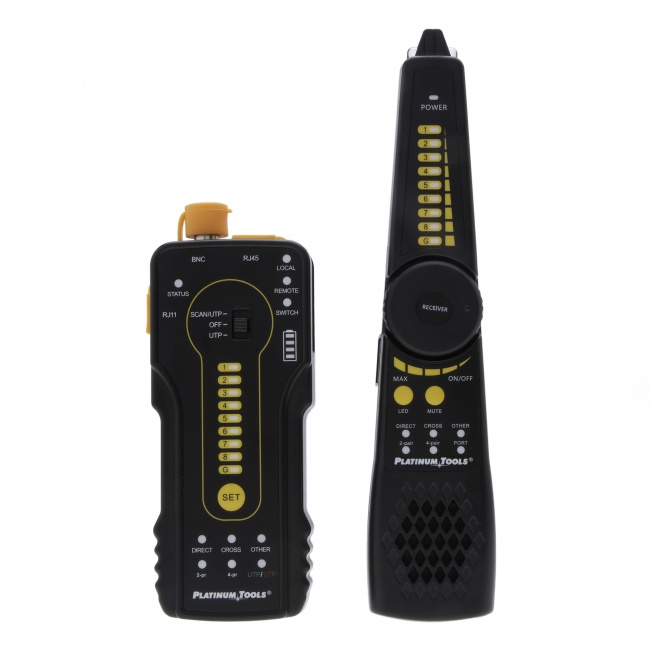
The VDV MapMaster 3.0 verifies all 8 conductors and measures cable length -- catches pair faults and confirms run distance.
Wiremap Tester with Length Measurement
Length and distance-to-fault are the deeper diagnostic when surface checks come back clean. The VDV MapMaster 3.0 measures length and will place a hard open on the run.
For diagnosis flow on a totally dead device, see how to troubleshoot PoE not working. For deeper voltage drop physics, see PoE voltage drop and cable length.
Frequently Asked Questions
Why is my PoE device losing power?
Five common causes: cable resistance from poor terminations, excessive cable length, CCA cable, switch PoE budget exhaustion, and class mismatch. Each presents differently. A PoE tester at the device end identifies which category a specific failure falls into.
How much PoE power loss is normal in a cable run?
10-20% on a 90-meter Cat6 run with proper terminations. The standards plan for this -- 802.3af's 15.4W PSE allocation arrives as 12.95W at the device. Loss above 25% on a normal run signals a problem.
How do I find which termination is causing power loss?
Measure voltage drop across each segment: switch to patch panel, patch panel to keystone, keystone to device. The segment with the highest drop per length contains the bad termination. Re-terminate that segment and retest.
Can switch firmware updates fix PoE power loss?
Sometimes. Firmware can fix bugs in class detection, allocation algorithms, and LLDP-MED negotiation. Always check vendor release notes for known PoE issues. Firmware will not recover loss in the cable run -- only the switch's own behavior.
Why does my PoE switch show available budget but new devices will not power?
Two causes: per-port configuration limiting class on specific ports, or the switch reserving headroom and refusing the last 5-10% of budget. Check per-port config in the switch CLI and verify with a PoE tester at the port.
Recover the Lost Watts
We do not sell a PoE tester. What we do sell tests the cable underneath the power: wiremap, continuity, length, and distance to fault. Source the PoE tester from a supplier who stocks one, and prove the cable first, because a split pair or a bad termination will fail PoE for a reason no PoE tester will ever name.