The Real-World Constraint
Greenfield commissioning is the easy case. Every cable test, voltage drop measurement, and PoE class negotiation can run on cold hardware before anyone uses it. The hard case is the running production install: 200 cameras across a campus, 80 access points across an office tower, the VoIP system that took the company two months to migrate to. Disrupting any of these for tests has a real cost.
The good news: a meaningful percentage of PoE verification can be done without ever touching a cable. The switch is the source of truth for class allocation, voltage applied, and current drawn -- and managed switches expose all of it via CLI or web interface. A tester at the device end is still the gold standard, but for routine health checks the switch view tells you 80% of what you need.
Non-Disruptive Checks (Do These First)
Switch PoE allocation summary
On Cisco IOS: show power inline. On Aruba/HPE: show power-over-ethernet brief. On Cisco Meraki and other cloud-managed: the dashboard PoE page. The summary shows total budget, allocated power, available power, and the allocation per port. This identifies budget pressure before it triggers an outage.
Per-port wattage and class
Drill into individual ports: show power inline interface gi1/0/24 on Cisco. This reports the negotiated class, voltage applied, current drawn, wattage delivered, and the operational state. Comparing this to baseline catches drift -- if a port's wattage was 12W last quarter and is 16W now, the device's draw is rising (possibly from increased compute load, possibly from cable resistance forcing it to draw more current).
Device health from the management plane
Cameras: confirm video streaming and frame rate. Access points: confirm radio operation and connected client counts. VoIP phones: confirm registration. A device that is "still working" in the management plane is at least getting enough power to function -- a useful first-pass check.
LLDP-MED neighbor table
If both ends support LLDP-MED, the switch's neighbor table shows what the device declares about itself: model number, firmware, and PoE requirement. Comparing the LLDP-declared PoE class against the switch's allocated class confirms the negotiation completed correctly.
Switch logs for PoE events
Search the switch logs for PoE-related events: power denied, port shed, overcurrent trip, classification failure. A pattern of these on a specific port indicates a degrading run worth investigating during the next maintenance window.
The Non-Disruptive PoE Audit
Run this every quarter on any site with significant PoE deployment:
| Check | Where | Red Flag |
|---|---|---|
| Total allocation vs budget | Switch CLI summary | Above 85% of budget |
| Per-port wattage trend | Per-port query, compared to baseline | 10%+ increase from baseline |
| Class negotiation matches expectation | Per-port show command | Class 0 reservations on devices that should be Class 4 |
| PoE event log entries | Switch logs | Recurring overcurrent or shed events |
| Device management status | NMS / camera console | Devices flapping, brief offline events |
| Switch internal temperature | Switch environmental status | Above manufacturer warning threshold |
Any red flag triggers a deeper investigation -- but the audit itself is zero-impact and takes 15 minutes per switch.
When You Must Briefly Disconnect
Some measurements require a tester between the cable and the device. The disconnection window is typically 30 seconds to 5 minutes per port, depending on what you measure.
Voltage at the device end
The switch reports voltage at the switch port. Voltage at the device end -- after the cable's resistive losses -- is the actual delivered voltage and the parameter that determines whether the device operates reliably. A PoE tester measures this in 30 seconds: unplug from device, plug into tester, read, plug back into device.
Wattage under simulated load
The device's current draw under normal operation may not represent its peak (PTZ motors moving, IR illuminators activating, AP serving many clients during a meeting). A tester with load simulation can verify the run sustains higher draw without voltage collapse. This requires the device to be temporarily disconnected for 1-2 minutes during the load test.
4-pair verification on 802.3bt installs
The switch reports class but cannot directly confirm that all four pairs are actually carrying power at the device end. A tester at the far end shows pair-by-pair power presence -- essential for confirming 802.3bt Type 3 and Type 4 installs are operating as designed.
How to Minimize Disruption
Schedule disruptive tests in batches
If you have 50 cameras to verify, schedule them into 5-camera batches over a maintenance window rather than testing one per day. Batching limits the number of times the operations team has to verify a brief outage was the test, not a real failure.
Keep recording redundancy in mind
Most NVRs handle a 30-second camera disconnect with a brief recording gap. For sites with strict continuous-recording requirements, coordinate with the security team to mark the test window in the audit log.
Use VoIP fallback during phone tests
Most modern VoIP systems support call forwarding to mobile during outages. Set forwarding before testing the desk phone PoE so users do not lose calls.
Pre-stage the test on the bench
Set up the tester, label leads, and confirm cable connections before starting the disruptive portion. Time the disconnection window from "device unplugged" to "device replugged" -- it should be under 60 seconds for a basic voltage check, under 3 minutes for a full load test.
Use management plane data first
Run the non-disruptive audit first to identify the ports that actually need physical testing. If 95 of 100 cameras show healthy switch metrics, only the remaining 5 need disruption-level investigation.
Tools for Existing-Install Testing
Pocket PoE Tester
Small enough to carry on every site visit. Plug-and-read in 30 seconds, with no wait for boot or menu navigation.
Multi-Function Network Tester
Puts cable performance, link speed, and the PoE reading in one unit, which saves a second trip up the ladder when you are investigating a run that works but underperforms. CableTestShop does not list a qualifier; a throughput result on a specific job is a rent-or-subcontract step.
Tone and Probe
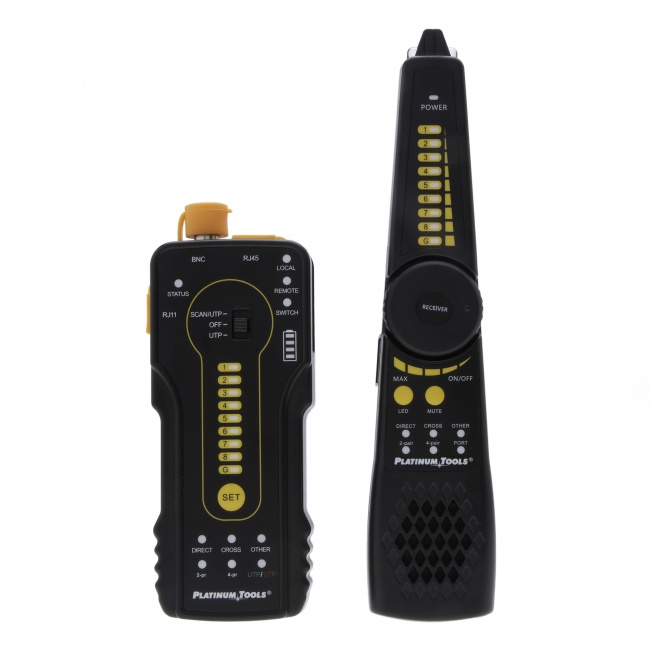
The Digital Tone and Probe traces which patch panel port a remote device is on, when LLDP discovery is unavailable.
For the broader procedure on individual port testing, see how to test PoE. For troubleshooting a specific failure, see how to troubleshoot PoE not working.
Documenting What You Find
For audit and capacity planning purposes, capture a per-switch report at each audit:
- Date of audit
- Switch model, firmware, and serial
- Total PoE budget and current allocation percentage
- Number of ports with PoE active and total wattage
- Any red-flag ports identified (above-baseline wattage, recent log events)
- Action items: ports requiring follow-up, planned maintenance, replacement triggers
Quarterly audit reports trend the budget pressure across switches. A switch that grew from 60% to 78% allocation across three quarters is on track to need a budget upgrade or device redistribution within the year.
Frequently Asked Questions
Can I test PoE without disconnecting the device?
Partially. The switch CLI reports class, voltage, and wattage at the source without touching the device. Voltage at the device end requires physically inserting a tester, which means a brief disconnect. For routine health checks, the switch view is sufficient; for verification of specific concerns, a 30-second device disconnect is usually acceptable.
What can I check from the switch without disrupting devices?
Per-port PoE state, class negotiated, voltage applied, current draw, wattage delivered, total budget allocation, and PoE log events. The show power inline command (or vendor equivalent) provides all of this. It identifies most PoE issues without touching the cable.
How do I verify a long-running PoE install is still healthy?
Read the switch's allocation summary, compare per-port wattage to baseline, check for PoE event log entries, and spot-check critical ports with a tester at the device end during scheduled windows. A quarterly audit catches drift before it causes outages.
Is it safe to plug a PoE tester into a live PoE port?
Yes. PoE testers participate in the IEEE 802.3 negotiation as valid PDs and accept power safely. Do not plug non-PoE equipment into PoE ports, and do not probe with a bare multimeter unless you know the pinout and use insulated probes.
How do I find which switch port a remote camera is on?
Three methods: MAC address table on the switch, LLDP/CDP discovery in the switch management interface, or tone generator at the camera end with probe at the patch panel. The first two are non-disruptive; the third requires brief device disconnection.
Verify Production Installs in Minutes
We do not sell a PoE tester. What we do sell tests the cable the power runs on: wiremap, continuity, length, and distance to fault, with certifiers available by quote. Budget for a PoE tester from another supplier, and verify the cable before you commission the link, so the power reading has a known-good run underneath it.