Why Data Center Certification Is Different
A data center is not a bigger office. The cable plant is denser, the performance budget is tighter, the failure cost is higher, and the documentation burden is heavier. A miswired classroom cable causes a help desk ticket. A miswired data center cable causes an outage that loses revenue by the second.
Three structural differences drive everything in data center cable certification:
- Density. A single high-density rack can hold 96 RJ-45 ports in 1RU. Patch fields concentrate hundreds of cables in a single zone. EMC, alien crosstalk, and bundle heat rise dramatically. Cat6A shielded or augmented unshielded cable becomes mandatory above 1,000 ports.
- Throughput targets. Production traffic is 10G everywhere on copper, with 25G and 40G top-of-rack to switch. Margins that pass in a Cat6 office build are unacceptable in a 10G data center fabric. Headroom matters.
- Audit lifecycle. Data center owners change. Tenants change. Operators change. The certification deliverable will be opened by people who were not in the building during install, sometimes years later. Documentation must stand alone.
The Standards Stack You Are Testing Against
Data center cable certification cites several overlapping standards. Knowing which one drives which test parameter saves arguments at acceptance.
ANSI/TIA-942-C (Data Center Telecommunications Infrastructure)
The umbrella spec for data center cabling. Defines the four Rated levels (formerly Tier I-IV) and the cabling, power, and HVAC redundancy required for each. Points at TIA-568.2-D for copper performance and TIA-568.3-D for fiber.
ANSI/TIA-568.2-D (Balanced Twisted-Pair Copper)
The performance spec for Cat5e through Cat8. The certifier you use must support the test limit for the cable category being installed. For Cat8, that means a certifier rated to 2,000 MHz.
ISO/IEC 11801-1 (International Equivalent)
Used in projects with European or international ownership. Class EA (Cat6A), Class FA (Cat7A), and Class I/II (Cat8) limits are slightly more conservative than TIA at the upper frequencies. If both standards are specified, test against the stricter one.
ANSI/BICSI 002 (Data Center Design and Implementation)
Best practice document, not a regulatory spec. Used by experienced data center designers to dictate things like pathway separation, bundle size limits, and labeling schemes that drive test result organization.
Permanent Link, Channel, and MPTL: Pick the Right Test
The single most common cause of certification disputes in data centers is the wrong test limit applied to the wrong topology. There are three real configurations and each has its own limit.
| Topology | What It Tests | When to Use | TIA Limit |
|---|---|---|---|
| Permanent Link | Patch panel to outlet, no cords | Contractor acceptance for horizontal copper | PL limit, 90m max |
| Channel | Equipment cord through patch field to user cord | Operational verification, troubleshooting | Channel limit, 100m max |
| MPTL | Patch panel to field-terminated plug | Direct device connection (transceivers, sensors) | MPTL limit (568.2-D) |
| Patch Cord | Pre-terminated cord assemblies | Acceptance of factory cords | Patch cord limit (component) |
For a typical data center horizontal install, the contractor delivers permanent link results. The operator runs channel tests as part of commissioning once equipment is racked. MPTL applies to direct-attached devices like transceivers, surveillance cameras in the cold aisle, or environmental sensors.
Building a Data Center Test Plan
Walking onto a data center floor with a certifier and no test plan is how you certify the wrong things twice. A good plan, written before the first cable is pulled, defines:
Cable Identification Scheme
Every link gets a deterministic ID. The standard format is ROW-RACK-RU-PORT (for example, A12-R03-U22-P14). The ID appears on both ends of the cable, on the patch panel label, on the as-built drawing, and as the cable identifier in the certifier file. Cable IDs that drift between deliverables are the number one source of audit failure.
Test Limit Selection
Specify the test limit (TIA-568.2-D Permanent Link Cat6A, ISO 11801 Class EA, etc.) and the certifier model approved for the project. The test limit must be locked at the start of the project. Switching halfway through creates two non-comparable datasets.
Sample Acceptance and Failure Workflow
Define what happens when a cable fails. Some specs require immediate re-termination and re-test. Others allow a defined number of retries before the cable is pulled and replaced. Write it down before the first FAIL appears.
Deliverable Format
PDF summary plus certifier-native binary files (.flw for Fluke DSX, .lwx for Softing WireXpert, etc.). Both. Always. The PDF satisfies the inspector. The binary file is what saves you in a dispute three years later when the original certifier model is the only thing that can re-analyze the dataset.
Field Practices That Prevent Failures
Most certification failures in data centers trace back to a small number of installation errors. Catch them in the workflow, not at the test phase.
- Untwist control. NEXT failures at 250 MHz and above are almost always excessive untwist at the termination. Cat6A jacks have integrated termination guides for a reason. Use them and trim flush.
- Bend radius. Cat6A minimum bend radius is 4x cable diameter installed, 8x during pull. Tight bends in the patch field are the second most common failure source. Use waterfall organizers, not 90-degree bends out of a panel.
- Bundle size. Cat6A UTP bundles larger than 24 cables develop alien crosstalk that can fail PSANEXT. Either keep bundles small or specify shielded cable from the start.
- Pathway temperature. Cable trays in the hot aisle ceiling can hit 40 C. Insertion loss derates accordingly. Run cable in cold aisle pathways where possible.
- Patch cord quality. Channel tests fail because of cheap patch cords more often than because of horizontal cable. Specify and test the cord brand. Reject unmarked cords.
Tools for Data Center Cable Verification
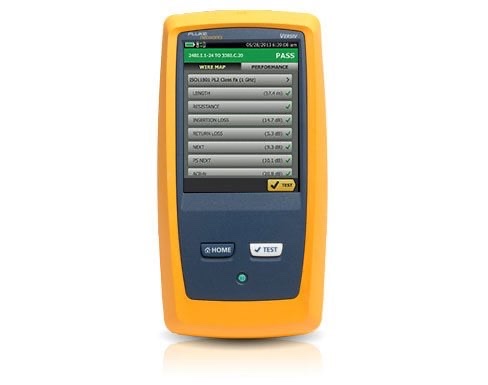
Full certification requires a Cat6A or Cat8 rated certifier from Fluke, Softing, or NetAlly. But the workflow around the certifier still depends on cable ID and basic verification tools.
For cable identification across a high-density patch field, the VDV MapMaster 3.0 with numbered ID remotes lets one technician walk a row and identify every cable terminated to a patch panel without two-radio coordination. The tester ships with one remote; the numbered ID remote sets are a separate purchase and not one we stock, so price them in before you plan a row in a day. For locating cables in unlabeled trays before terminating, the Digital Tone & Probe traces through bundles where analog tone gets lost in the noise.
For pre-cert qualification of installed runs, a gigabit speed qualifier catches cabling problems that would fail certification before you commit certifier time to them. Platinum Tools has discontinued the unit that filled that tier for us, so it is a rental or subcontract step rather than something we stock.
Designing the Deliverable for Audit Survival
A data center certification deliverable that satisfies the original install team often fails the next audit because the people opening it have no context. Build the package to survive ownership changes and tenant turnover.
- Single PDF cover. Project name, date range, certifier model and serial, certifier calibration date, test limit applied, and total link count grouped by category and topology.
- Index by location. Reports grouped by row, rack, and patch panel. Each section has its own summary page with PASS/FAIL counts.
- Native files in parallel. The binary certifier files mirror the PDF structure in a folder tree. The binary files are what re-analysis tools need.
- Calibration certificates. The certifier calibration certificate for the calendar period of the testing, included as an appendix.
- Cable bill of materials. The cable manufacturer, part number, lot number, and reel ID for the cable used. Manufacturers require this for warranty registration.
Read more on report structure in our guide to understanding network certification test reports and our cable tester vs certifier comparison.
Frequently Asked Questions
What category of cable should be installed in a new data center?
For copper, Cat6A is the practical baseline for new data center installs in 2026. It supports 10GBASE-T to 100 meters, has the EMC performance required for high-density patch fields, and is recognized in ANSI/TIA-942-C as a minimum for horizontal copper cabling. Cat8 is appropriate for top-of-rack to switch links under 30 meters where 25G or 40G copper is required.
Is permanent link or channel testing required for data center certification?
Both, when the deliverable is a full as-built record. Permanent link is the contractor acceptance test that verifies the installed plant from patch panel to outlet, excluding cords. Channel tests include the equipment cords and prove the operational link will perform in service. Most data center owners accept permanent link as the contractual deliverable and require channel testing only when troubleshooting field issues.
How do MPTL tests differ from permanent link in data centers?
MPTL terminates the horizontal cable directly into a plug at the device end instead of a jack and patch cord. TIA-568.2-D added a dedicated MPTL test limit because the geometry of a field-terminated plug differs electrically from a permanent link. Reporting an MPTL link against the standard permanent link limit will produce false PASS results and void manufacturer warranty coverage.
How many test points should a data center cable certification include?
100% of installed copper links must be certified. Sample testing is not acceptable for data center work. Each link gets a unique cable ID, a certifier-native binary file, and a PDF result page.
What environmental conditions affect data center cable certification?
Insertion loss varies with temperature at roughly 0.4% per degree C above 20 C for unshielded cable and 0.2% for shielded. Hot aisle containment can push horizontal cable bundles above 35 C, costing 6 to 8% of insertion loss budget. Run channel tests with the cooling configuration that will exist in production.
Tools for Data Center Cable Work
From cable ID and tone tracing through gigabit qualification, equip your data center build with the right verification tools.