Trust, But Verify
The default assumption when a cable tester shows a fault is that the cable is faulty. This is correct most of the time -- modern testers are accurate, and the cable usually does have the problem the tester is describing. Acting on tester results is the right behavior, and skepticism about every tester reading would slow you down to no purpose.
But sometimes the tester is wrong. Sometimes the cable is fine and the tester or its accessories are causing the misreading. Sometimes the tester is correct in detecting a problem but wrong about the location, the type of fault, or the severity. Recognizing tester-side errors saves the time you would otherwise spend re-pulling cable that has nothing wrong with it.
The diagnostic discipline is: when a tester result does not match physical reality (cable length is clearly wrong, the cable was just installed and tested fine yesterday, every cable is reporting the same fault), pause and verify the tester before acting on the result.
Common Causes of Incorrect Tester Readings
| Symptom | Common Cause | Quick Verification |
|---|---|---|
| Wrong length displayed | NVP not calibrated to cable type | Test a known-length cable of same type |
| Inconsistent results | Loose connection or weak batteries | Replace patch cords, fresh batteries |
| Every cable shows fail | Damaged tester or remote unit | Test known-good reference cable |
| Same fault on every cable | Damaged tester port or contact | Inspect tester ports for damage |
| False short reported | Damaged patch cord at tester end | Swap test patch cord |
| False open reported | Loose contact, bent pin in tester socket | Inspect tester ports under magnification |
| Cert fail on previously passing cable | Calibration drift, damaged accessories | Re-run calibration; check accessories |
| PoE voltage way off | Tester battery low or damaged contacts | Fresh batteries; clean contacts |
| Random results | Tester firmware bug or hardware fault | Reset, update firmware, contact mfr |
Length Errors: The NVP Problem
The single most common "incorrect reading" we hear about is wrong cable length. The customer measures the cable physically as 75 meters; the tester reports 68 or 82. The cable is fine; the tester just does not know what kind of cable it is testing.
Why NVP matters
Cable testers measure length by sending a pulse down the cable and timing how long it takes to reflect off the far end. The pulse travels at a velocity that depends on the cable's electrical and physical properties -- specifically the nominal velocity of propagation (NVP), expressed as a percentage of the speed of light. Cat5e typical NVP is around 64-72%; Cat6 is around 70-76%; Cat6A varies by manufacturer; and so on. The tester multiplies measured time by speed of light times NVP to calculate length.
If the NVP setting on the tester does not match the actual NVP of the cable, the reported length is wrong by the percentage error between the two values, applied across the full cable length. A 5% NVP error gives a 5% length error -- 4.5 meters wrong on a 90 meter cable.
NVP calibration procedure
- Identify the cable manufacturer and category from the cable jacket markings if possible
- If the manufacturer publishes an NVP value for the cable, enter that value in the tester
- Otherwise, take a known-length sample of the same cable type (a 30 meter spool you can measure with a tape) and use the tester's NVP calibration function
- The calibration function adjusts NVP until the measured length matches the known length
- Save the calibrated NVP for use on subsequent runs of the same cable type
Test Patch Cord Problems
Cable certifiers and qualification testers use specific test patch cords (sometimes called test leads or permanent link adapters) to interface with the cable being tested. These are precision components; they are part of the measurement system, not generic patch cables. Damaged, worn, or substituted test patch cords cause inaccurate readings.
Symptoms of bad test patch cords
- Inconsistent results between consecutive tests of the same cable
- NEXT or return loss failures that disappear when patch cords are wiggled
- False faults at the tester end of cables that pass when retested
- Visible boot wear, frayed cable jacket, or loose strain relief on the patch cord itself
Best practices
- Use only the manufacturer-supplied test patch cords with certifiers
- Replace test patch cords on a schedule (typically every 1,000 to 5,000 tests, per manufacturer recommendation)
- Inspect test patch cords visually before each session
- Carry spares for field replacement if a patch cord becomes suspect
- Run a self-test or reference test at the start of each work session to verify the tester and patch cords are healthy
Verifying the Tester With a Reference Cable
The fastest way to confirm whether your tester is working correctly is to test a known-good reference cable. Keep a 5 to 10 meter reference cable in your kit, of known good quality and tested previously to pass certification. Test this cable at the start of any session where you suspect tester problems.
Reference cable test results tell you:
- If the reference passes cleanly: tester and patch cords are healthy, the suspect cable in the field has the actual fault
- If the reference fails the same way as field cables: tester or patch cords are the source of the false faults
- If the reference passes but field cables fail: confirm the field cables genuinely have problems
- If the reference passes some tests and fails others: intermittent tester or patch cord issue
This 30-second test eliminates the largest source of misdiagnosis. The customer's installer who reports "the tester is broken" usually has a damaged patch cord that a reference cable test would have caught immediately.
Calibration and Drift Over Time
Different testers have different calibration requirements.
Basic wiremap testers
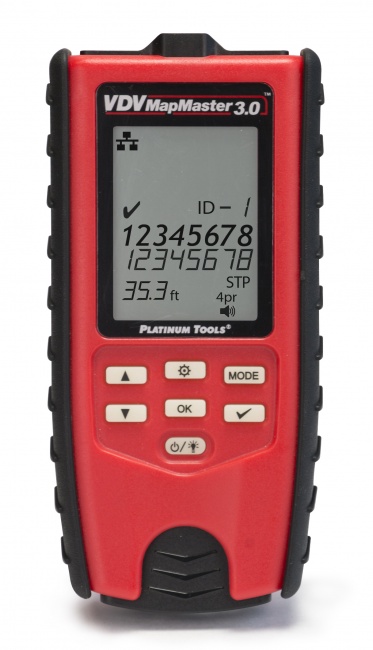
Wiremap testers like the VDV MapMaster 3.0 are pass/fail digital devices that do not require periodic calibration. They either work or do not. If they fail, they fail unambiguously; you do not get drifted measurements.
Qualification testers
Qualification testers include analog measurement circuitry that benefits from periodic verification. Manufacturers typically recommend annual calibration. Many users find that the qualification testers hold calibration well between annual checks but the manufacturer's recommendation is the safer practice.
Certifiers
Cable certifiers are precision RF measurement instruments that require formal annual calibration to maintain accuracy at high frequencies. Calibration is typically performed by the manufacturer or an authorized service center using traceable reference standards. The calibration certificate documents the tester's accuracy and is often required by customers as proof that certification reports are valid.
Use a certifier past its calibration date and your reports may not be accepted by the customer or the cable manufacturer's warranty program. Track calibration due dates carefully.
Power, Batteries, and Environmental Factors
Battery health
Low battery is a surprisingly common cause of inaccurate readings on tester-supplied measurements (PoE voltage, signal generation amplitude, length measurement). Most testers have a battery indicator; check it before serious diagnostic work. Replace batteries at the start of a long session rather than partway through.
Temperature effects
Some testers are specified for narrow operating temperature ranges. Cold weather work with batteries can give marginal performance; very hot environments can cause measurement drift. Check the tester's specified operating temperature range and let the tester equilibrate to ambient temperature before serious measurements.
Tester contact wear
The RJ45 sockets on the tester body wear over time, especially with heavy use. Worn contacts cause intermittent connections that show up as random faults. Inspect tester sockets under magnification periodically. Manufacturers offer replacement modules for some testers when sockets wear out.
Reference Tools and Best Practices
Reference cable
A 5 to 10 meter known-good cable for verifying tester health. Keep it in the test kit, away from physical stress, and test it at the start of suspect sessions.
Replacement test patch cords
Manufacturer-supplied test cords for your certifier or qualification tester. Carry spares; replace on schedule.
Tone-and-trace for verification
A tone-and-probe set verifies physical cable continuity independently of the wiremap tester, useful when you suspect tester error.
The "Tester Might Be Wrong" Checklist
When you suspect tester error rather than cable fault, run through this short checklist:
- Test a known-good reference cable -- does it pass cleanly?
- Check battery level -- replace if low
- Inspect test patch cords for visible wear -- swap with spares if suspect
- Inspect tester ports for bent pins or visible damage
- Verify NVP calibration is appropriate for the cable type being tested
- Reset the tester and retest
- If on a certifier, check calibration date -- past due means results are not authoritative
- Update tester firmware if a newer version is available
- If the issue persists across all of the above, the tester needs service
For broader cabling diagnostic context see our guides on how to find a cable fault fast and what to do when cable fails certification.
Frequently Asked Questions
Why does my tester show wrong cable length?
Cable length is calculated from propagation delay and the cable's NVP. If the NVP setting on the tester does not match the actual cable, the reported length is wrong by the NVP percentage difference. Calibrate NVP against a known-length sample of the same cable type.
Why does my tester report different results each test?
Inconsistent results indicate intermittent connections, weak batteries, or environmental interference. Verify connections, replace batteries, eliminate cable movement during testing, and reset the tester. Persistent inconsistency may indicate damaged tester needing service.
My tester shows fault but cable looks fine -- which do I trust?
Trust the tester first, then verify with a known-good reference cable. If the tester passes the reference but fails the suspect cable, the cable has the fault. If the tester fails the reference too, the tester or its accessories are the problem.
Do cable testers need calibration?
Basic wiremap testers do not require formal calibration. Qualification testers and certifiers require periodic calibration, typically annually, to maintain measurement accuracy. Certifier calibration certificates are often required for contractual reporting.
Tools You Can Trust on Every Test
Wiremap testers, qualification tools, and certifiers from the brands working techs rely on.