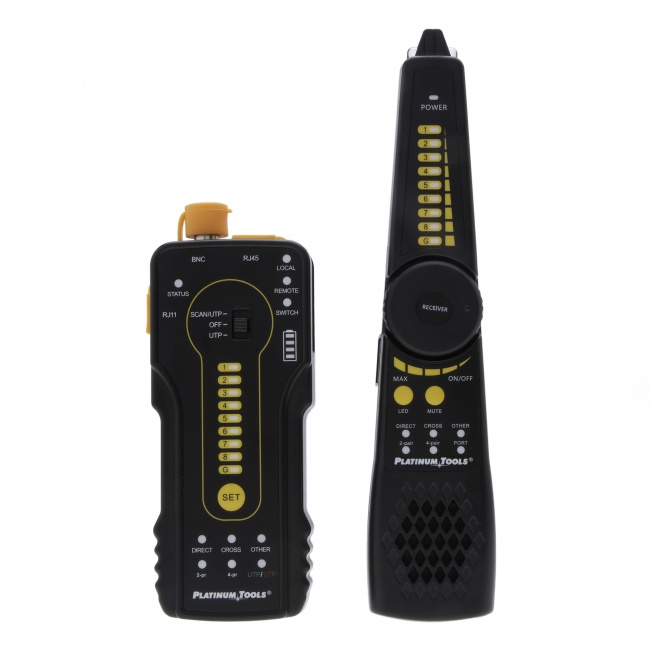
What a Tone and Probe Actually Does
A tone generator is a small battery-powered box with two leads (alligator clips, RJ45 plug, or a banana jack adapter) that injects a recognizable audio-frequency signal onto a wire. The probe is a separate handheld unit with a metallic tip that capacitively senses the field radiated by the toned wire, amplifying it into an audible signal you hear through a built-in speaker.
Together, they answer one of the most common questions in low-voltage work: which cable is which. In a bundle of fifty unlabeled drops at a patch panel, the toner clips on at the wall jack, the probe sweeps across the bundle, and the loud cable is the one you want.
Setting Up the Tone Generator
Connect the toner at the known end
The "known end" is wherever you can identify the cable — the wall jack, the camera location, the access point port. The toner clips onto a single conductor or onto a pair, depending on the model. For an RJ45 toner like the Digital Tone Probe, the cable just plugs into the jack on top.
Single conductor vs both conductors
For maximum signal radiation, connect to one conductor and leave the other floating. The toner needs an unbalanced signal to radiate well — a balanced signal across a tightly-twisted pair cancels itself and produces almost no detectable field. Most modern toners default to the correct configuration when you plug a cable into their RJ45 jack.
Set the tone mode
If your toner has multiple modes (slow warble, fast warble, solid tone), pick something distinctive. In a busy environment with overlapping toners — yes, this happens on large jobs with multiple techs — pick a mode that sounds clearly different from anyone else's.
Verify it is working
Pick up the probe at the toner end before you walk away. Sweep over the cable a few inches from the connection. You should hear a strong signal. If you hear nothing, your batteries are dead, the toner is misconfigured, or the cable is broken between the toner and the test point.
Probe Technique That Actually Works
Hold the probe like a pencil
Grip the body of the probe close to the tip with your dominant hand. Use a relaxed pencil grip, not a fist. The shorter your grip, the more controlled the sweep.
Adjust sensitivity progressively
Start with sensitivity at maximum and sweep over the bundle. Most cables will produce some response from induced energy. Note the loudest one, then turn the sensitivity down until only the loudest cable is audible. That is your target.
Sweep, do not hover
Move the probe across the bundle in a steady sweep at about one inch per second. The signal level varies with proximity, so a fixed-position probe gives you a constant tone that tells you nothing. Sweeping reveals the peak.
Confirm by isolating
Once you think you have found it, lift that one cable out of the bundle and sweep again. The signal should now be dramatically louder. If it is not, you have not found the right cable.
Do not trust just one direction
If the bundle is dense, sweep from multiple angles — top, bottom, both sides. Sometimes the loudest cable from above is not the actual target because of how the bundle wraps.
Analog vs Digital Toners — Which to Buy
| Aspect | Analog | Digital |
|---|---|---|
| Signal type | Continuous audio tone (warble or solid) | Encoded digital signature |
| Probe compatibility | Any analog probe | Must use matching digital probe |
| Noise immunity | Picks up fluorescent ballasts, motor noise, induced 60 Hz | Filters out everything except the encoded signal |
| Best for | Residential, clean electrical environments | Commercial, industrial, panels with VFDs or PoE switches |
| Range | ~10-30 feet through drywall | ~10-30 feet through drywall, less false positives |
| Price | $30-$60 | $80-$120 |
For most professional contractors working in commercial spaces, digital is the right answer. The added cost is paid back the first time you avoid spending an hour chasing a phantom signal from an HVAC controller.
Common Use Cases on the Jobsite
Identifying a cable in a bundle at the patch panel
Tone the cable at the wall jack. Walk to the IDF and sweep across the patch panel cables behind it. Punch the loudest one down and label it. This is 80% of all toner work.
Locating a cut or break
Tone one end of a suspect cable. Walk along its run with the probe. The signal will be present up to the break, then disappear. The dropoff point is your fault location, accurate to within a few inches.
Tracing a run inside a wall
Tone the cable at one end. Sweep the probe along the wall in the suspected path. The cable's location through the studs becomes audible. Useful when adding a new outlet or when an old run is undocumented.
Verifying which port is which on a switch
Tone the cable at the wall jack. The probe held against the back of the patch cable in the rack will identify which switch port the cable is plugged into.
Quick continuity check
Most modern toners include a polarity LED that lights when the cable forms a closed loop. Plug the toner into one end and short the other end with a paperclip — if the LED lights, the cable has continuity. Faster than a multimeter for a yes/no answer.
The Gotchas That Trip Up New Techs
Inductive bleed
Your tone signal can capacitively couple from the target cable into adjacent cables in the same bundle, making them ring at lower volume. Solution: turn down probe sensitivity until only the loudest cable is audible.
Toning into a powered switch port
Most toners refuse to drive a tone into a port that is providing PoE or detecting a link partner. Always disconnect the cable from the active equipment before toning. Toning the unplugged cable end is normal practice.
Phantom tones from electrical noise
Analog toners pick up 60 Hz from nearby AC wiring as a low buzz. New techs sometimes mistake this for the target signal. The target tone is recognizably the same modulation pattern as what the toner outputs (slow warble, fast warble) — random buzzing is not your tone.
Forgetting to verify at the toner end
Always test the probe at the toner end before walking off. A dead probe battery will have you walking miles for nothing.
Trying to tone through metal conduit
Steel conduit is a Faraday cage at audio frequencies. The signal does not radiate through it. You can pick up the tone where the cable enters and exits the conduit, but not in between. Plan your tone path accordingly.
Recommended Tone Generators and Probes
Best Overall: Digital Tone & Probe Kit
$202.66. Digital signal encoding eliminates false positives in noisy environments. Adjustable probe sensitivity. Works on RJ45 data cables, telephone, and bare conductors. The right answer for most contractors.
Budget: Klein VDV500-820
~$45. Classic analog toner-probe combo. Fine for residential and clean commercial work. Skip it if you are regularly in industrial spaces with VFDs or large motors.
Combo: LanSeeker
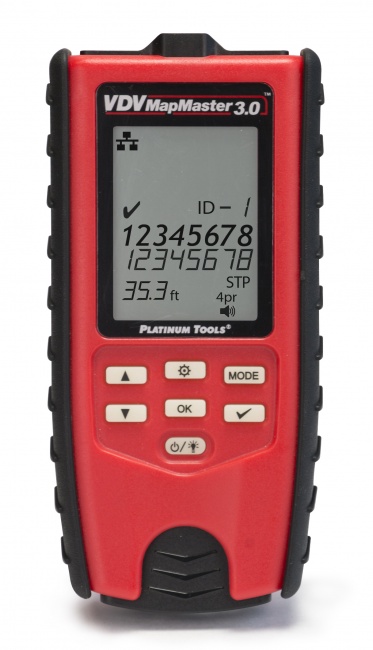
$80.08. Built-in tone generator combined with a wiremap tester. Two tools in one for techs who want a single pocket device.
Frequently Asked Questions
How does a tone generator and probe work?
The toner injects an audio-frequency signal onto a conductor at one end. The probe is a high-impedance amplifier with a sensitive antenna that detects the radiated field capacitively. Sweep the probe across a bundle and the cable carrying the tone produces an audible signal.
What is the difference between an analog and digital tone generator?
Analog toners produce a continuous audio tone that any probe can pick up — including false hits from electrical noise. Digital toners encode a unique signal that only a matching digital probe decodes, dramatically reducing false positives in commercial and industrial environments.
Can a tone probe trace a cable through a wall?
Yes through drywall and most ceiling tiles, no through metal conduit, concrete, or metallic-backed insulation. Standard signal radius is about 10-30 feet through drywall depending on the toner power and probe sensitivity.
Can I use a tone probe on energized cables?
Safe on data cables, phone pairs, and de-energized low-voltage wiring. PoE is generally fine because the voltage is under 60 V DC. Never clip onto AC mains or any circuit not verified de-energized — most toners are not rated for line voltage and may be damaged or destroyed.
Do I need a tone probe if I have a network analyzer?
Yes. Cable testers identify cables by lighting LEDs on remote units at the far end — useless when there are dozens of unlabeled cables between them. A tone probe identifies cables in bundles, traces runs through walls, and locates breaks on damaged cables. Most working techs carry both.
Get the Right Toner for Your Work
Digital toners for commercial work, analog for residential, combo testers for the toolbelt — see them all.